
API Documentation SEO: How to Make Your API Docs Rank
API documentation SEO is the practice of structuring, rendering, and linking your published API reference and guides so that search engines can crawl, index, and rank individual pages for the queries your target developers type. When done well with a tool like Apidoke, your docs site can surface in Google for long-tail searches like "how to paginate the Orders API" before a developer even reaches your marketing site.
- API docs are often the highest-traffic pages a developer-focused company owns, yet most teams publish them with zero on-page SEO consideration.
- Server-side rendering (SSR), canonical URLs for versioned docs, structured data for code examples, and deliberate internal linking are the four pillars of a working API docs SEO strategy.
- Apidoke's one-click public publishing outputs static, crawlable HTML so search engines index every endpoint page without JavaScript execution.
- The same optimizations that help Google also help AI answer engines (ChatGPT, Gemini, Perplexity) identify and quote your documentation as a trusted source.
Why API documentation SEO is different from regular content SEO
Most SEO advice targets blog posts or landing pages. API docs have a distinct anatomy: a navigation panel on the left, prose in the center, and a live console or code samples on the right. Each endpoint description is a candidate page in its own right. A POST /orders endpoint description, a 401 Unauthorized error reference, and a pagination guide are three separate search intents.
The structural differences that make API docs hard to optimize:
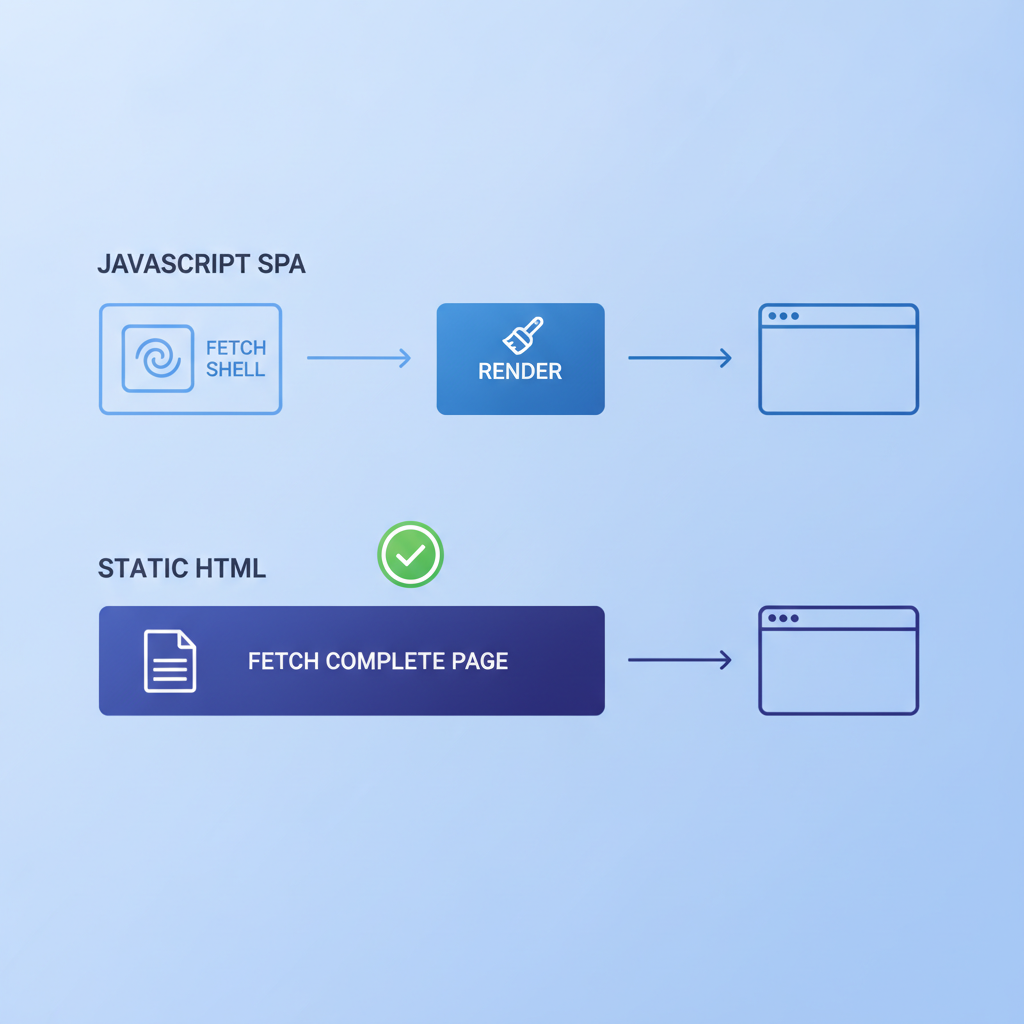
- Client-side single-page applications (SPAs) render docs in JavaScript, which Googlebot must execute before seeing content. Googlebot does execute modern JavaScript, but there is a crawl budget cost and a rendering delay that can push pages out of the index.
- Versioned docs (/v1/, /v2/, /v3/) create near-duplicate pages. Without canonical tags, Google may index the wrong version or divide link equity across all of them.
- Navigation-heavy templates often repeat hundreds of anchor links on every page, diluting the relevance signal on individual endpoint pages.
- Code blocks are not natively understood by search engines as structured data, so they rarely trigger rich results unless you add schema markup.
Pillar one: render HTML that Googlebot can read without JavaScript
Search engine crawlers operate on a crawl budget. Even though Google can render JavaScript, pages that serve fully-formed HTML on the first response get indexed faster and more reliably. This is sometimes called "server-side rendering" (SSR) or, in static-site contexts, "pre-rendering."
When Apidoke publishes your docs with one-click public publishing, the output is static HTML. Every endpoint page, every group section, and every error reference is a real HTML document. Googlebot fetches /reference/orders/ and receives a complete page, not a JavaScript shell that requires a second rendering pass.
To verify your own docs, run a quick test:
- Open your terminal and run
curl -A "Googlebot" https://yourdocs.example.com/reference/orders/. - Search the output for your endpoint name and a meaningful heading, such as
<h1>POST /orders</h1>. - If the response is a JavaScript bundle with no visible content, you have an SSR problem. The page will eventually index, but later and less reliably.
- If the response contains your heading, description, and at least one code sample, the page is crawler-friendly.
Google's own JavaScript SEO documentation explains that dynamically rendered content may be indexed on a "second wave" that lags days behind the initial crawl. Static HTML avoids that lag entirely.
Pillar two: a canonical strategy for versioned API documentation
A canonical URL (defined via <link rel="canonical" href="..." />) tells search engines which version of a page is the authoritative one. Without it, Google decides on its own, and it often picks the wrong version or splits ranking signals across duplicates.
For versioned API docs, you have two legitimate strategies:
| Strategy | When to use it | Canonical points to | Trade-off |
|---|---|---|---|
| Latest-wins | Older versions are deprecated and you want all traffic on the current version | The /latest/ or /v3/ URL on every equivalent page | Developers searching for v1 behavior may land on v3 docs and be confused |
| Per-version canonical | You actively support multiple versions and each has distinct search demand | The page's own URL (self-referencing canonical), plus a noindex on sunset versions | More complex to maintain; requires a process for marking versions as sunset |
| Version selector with noindex on old | Most practical default for teams with 2 to 3 live versions | Current version pages are self-canonicalized; older versions get noindex | Older-version pages disappear from search, which is usually the right call |
Apidoke's per-project version history keeps each version in a named snapshot. When you publish a new version, the previous snapshot is still accessible via its URL. If you are running self-hosted Apidoke, add a noindex meta tag or a robots.txt disallow rule on any version path you consider deprecated. For the live version, ensure each page carries a self-referencing canonical or an explicit canonical pointing to the path you want ranked.
The IETF HTTP RFC 9110 is worth keeping handy here because canonical strategy intersects with redirect decisions. A 301 redirect from /v1/orders/ to /v3/orders/ passes link equity and removes the duplicate. A 200 with a canonical header is a softer signal and Googlebot may or may not respect it.
Pillar three: structured data for code samples and API endpoints
Structured data is machine-readable metadata embedded in a page (usually as JSON-LD in a <script> tag) that tells search engines and AI systems what a piece of content represents. Google uses it to generate rich results. AI answer engines use it to attribute answers to specific sources.
For API documentation, two schema types are most useful:
SoftwareSourceCode for code examples
The schema.org SoftwareSourceCode type lets you annotate code blocks with the programming language, a description, and the author. An example for a cURL snippet on a POST /orders endpoint page:
<script type="application/ld+json">
{
  "@context": "https://schema.org",
  "@type": "SoftwareSourceCode",
  "name": "Create an order (cURL)",
  "description": "Send a POST request to /orders to create a new order resource.",
  "programmingLanguage": "Shell",
  "codeSampleType": "full",
  "text": "curl -X POST https://api.example.com/orders -H 'Authorization: Bearer TOKEN' -H 'Content-Type: application/json' -d '{\"item_id\": 42, \"quantity\": 1}'"
}
</script>
This does not guarantee a rich result today, but it positions the page well as schema.org coverage for code improves in search features.
FAQPage for error reference sections
Error documentation maps naturally to FAQ structured data. A 401 Unauthorized, a 404 Not Found, and a 429 Too Many Requests each have a clear question ("What does a 401 mean for this API?") and a clear answer. Wrapping those sections in FAQPage schema helps Google pull them into People Also Ask boxes and helps AI engines cite them directly.
<script type="application/ld+json">
{
  "@context": "https://schema.org",
  "@type": "FAQPage",
  "mainEntity": [
    {
      "@type": "Question",
      "name": "What causes a 401 Unauthorized response from the Orders API?",
      "acceptedAnswer": {
        "@type": "Answer",
        "text": "A 401 means the Authorization header is missing or the Bearer token has expired. Refresh the token and retry the request."
      }
    },
    {
      "@type": "Question",
      "name": "What does a 429 Too Many Requests error mean?",
      "acceptedAnswer": {
        "@type": "Answer",
        "text": "The client has exceeded the rate limit. Wait for the Retry-After header value (in seconds) before sending the next request."
      }
    }
  ]
}
</script>
Writing API Blueprint source that generates SEO-friendly output
API Blueprint is a Markdown-based description format used by Apidoke. The structure of your .apib file directly determines the heading hierarchy and page segmentation of your published docs. A well-organized Blueprint produces pages with clean H1/H2/H3 structures, which is exactly what search engines and accessibility tools want.
A minimal, SEO-conscious API Blueprint excerpt for a Users resource:
FORMAT: 1A
HOST: https://api.example.com

# Example API

## Group Users

Endpoints for managing user accounts.

### Users Collection [/users]

#### List all users [GET]

Returns a paginated list of user objects. Supports `limit` and `offset` query parameters.

+ Response 200 (application/json)

        {
          "data": [
            { "id": 1, "name": "Aiko Tanaka", "email": "aiko@example.com" }
          ],
          "total": 1,
          "limit": 20,
          "offset": 0
        }

+ Response 401 (application/json)

        {
          "error": "unauthorized",
          "message": "Bearer token is missing or has expired."
        }
Notice the pattern: the Group name becomes a navigable section, the resource name becomes a page-level heading, and each action (GET, POST) becomes a sub-heading. When Apidoke renders this to HTML, the structure maps to H2 (group), H3 (resource), H4 (action). Search engines read that hierarchy and understand which term is most important on the page.
Concrete things to do in your Blueprint source to improve the rendered output's SEO:
- Write a meaningful description paragraph under each Group. That prose becomes the meta description candidate for the section page.
- Use full English action names ("Create a user account") rather than terse abbreviations ("Create user"), because the action name becomes page copy.
- Include realistic request and response bodies with representative field names. Search engines index the text content of code blocks; a body that says
{"item_id": 42}is far more useful than{"x": 1}. - Document every status code you actually return (200, 201, 400, 401, 404, 429, 500). Each documented status code is a real search query someone might type.
For a deeper look at authoring correct Blueprint request and response bodies, see the guide on API Blueprint request and response body syntax.
Pillar four: internal linking between docs and marketing pages
Internal links pass authority and help search engines understand your site's topical hierarchy. Most API documentation sites treat the docs as a silo, completely disconnected from the marketing site. That is a missed opportunity in both directions.
From docs to marketing: a "Get started" call to action in your API reference can link back to your marketing homepage or your quickstart landing page. Those links pass some authority from the (often high-traffic) docs pages back to the commercial pages, and they create a navigation path for developers who want to upgrade or share the tool.
From marketing to docs: every feature mention on a marketing page is a link opportunity to a specific docs section. "Rate limiting" on your features page should link to /reference/rate-limits/. "Authentication" should link to /reference/authentication/. These contextual links help both crawlers and developers.
From docs to docs: cross-link related endpoint pages. If the POST /orders page mentions that it returns an Order object, link the word "Order object" to the GET /orders/{id} page. This builds a crawlable mesh and reduces dead-end pages.
This article is part of a broader set of developer experience best practices for API teams that covers the full lifecycle of planning, writing, and publishing API documentation.
Page titles and meta descriptions for API endpoint pages
Every endpoint page needs a unique, descriptive title tag. The default pattern many doc tools use is "POST /orders | API Reference," which is too terse to rank for natural-language queries. A better pattern includes the action in plain English:
| Default title (poor) | Optimized title (better) | Why it ranks better |
|---|---|---|
| POST /orders | API Reference | Create an Order | Orders API Reference | Matches "create an order API" queries |
| GET /users/{id} | Get User by ID | Users API Reference | Matches "get user by id api" queries |
| 401 Unauthorized | 401 Unauthorized Error | Authentication API Reference | Matches "401 unauthorized [product name] api" queries |
| Rate Limits | API Rate Limits: Limits, Headers, and Retry Behavior | Matches "api rate limit retry" long-tail queries |
Meta descriptions for endpoint pages should front-load the HTTP method, the resource, and a concrete outcome: "Send a POST request to /orders with a JSON body to create a new order. Returns a 201 Created response with the full order object." That sentence is specific enough to attract clicks from developers who already know what they need.
How Apidoke's published output helps with crawlability
When you publish API docs with Apidoke, several technical SEO properties come for free because of the static-HTML output model:
- Every page is a real URL, not a hash-routed SPA fragment. Google can crawl /reference/orders/ as a distinct page, not as /#orders.
- The three-column layout keeps navigation, content, and the try-it console visually separated. Search engines read the main content region and are not confused by the navigation column.
- The live try-it console fires real HTTP requests from the browser. Authentication tokens never reach Apidoke servers, which means there is no backend processing of credentials. This is worth mentioning in your docs as a trust signal: developers searching for "is [your API] docs safe to try" get a concrete answer.
- Per-project version history creates named snapshots. You control which versions are public and which are not, so you can retire old versions from search without deleting the content.
If you are running a self-hosted instance, you have full control over your server configuration. You can add a sitemap.xml listing every endpoint page, set Cache-Control headers to cache static HTML at the CDN edge (fast time-to-first-byte matters for Core Web Vitals), and configure robots.txt to block deprecated version paths. The guide on self-hosting your API documentation covers the deployment setup in detail.
Measuring API documentation SEO performance
You cannot improve what you do not measure. For API docs, the metrics to track are:
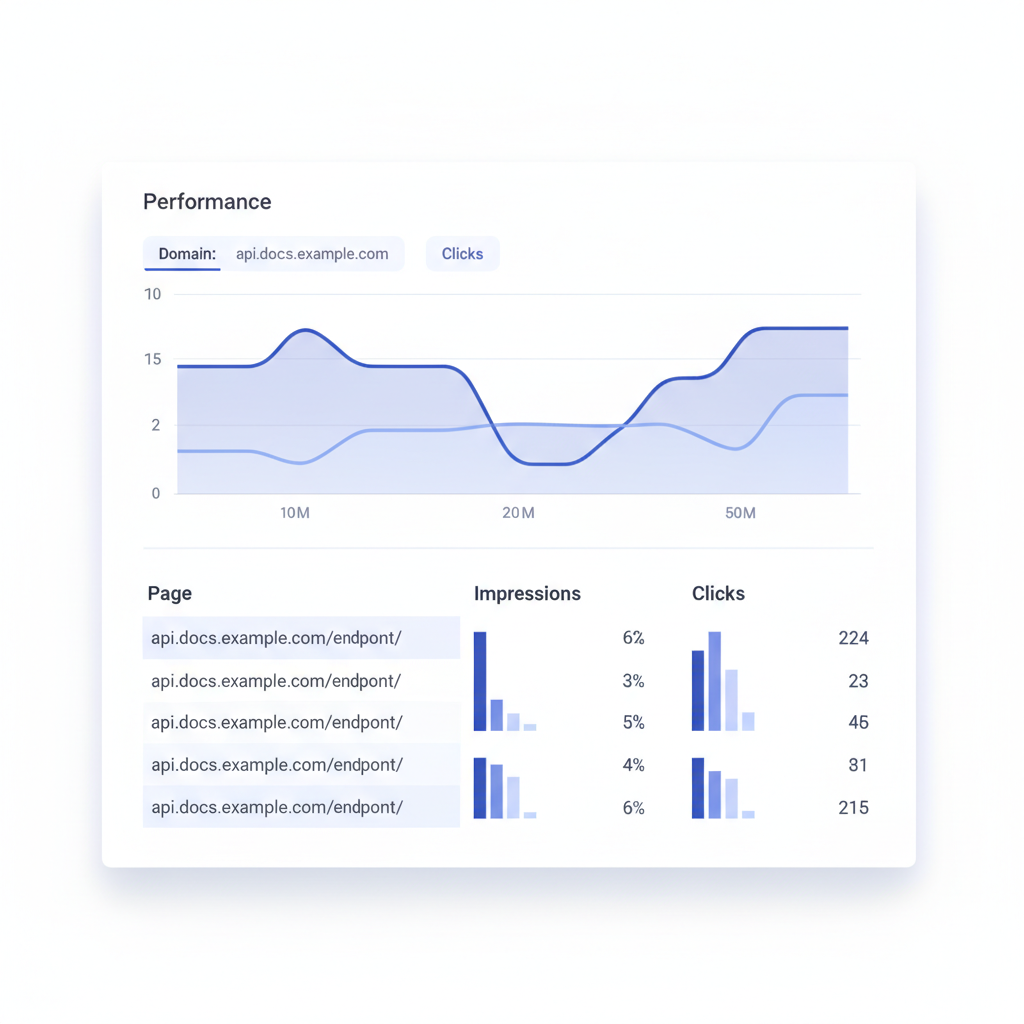
- Indexed pages: Use Google Search Console's Coverage report. If you have 80 endpoints and only 30 are indexed, you have a crawl or rendering problem.
- Impressions by page: In Search Console's Performance report, filter by page to find which endpoint pages are already getting impressions. Those pages are ranking for something; optimize their titles and descriptions first.
- Core Web Vitals: Largest Contentful Paint (LCP), Cumulative Layout Shift (CLS), and Interaction to Next Paint (INP) all affect ranking. Static HTML typically scores well on LCP and CLS. Docs with heavy JavaScript consoles can struggle on INP.
- AI citation rate: Perplexity, ChatGPT, and similar tools cite sources when they quote content. Monitor your brand name in those tools' outputs periodically. If competitors' docs are cited and yours are not, the structured data and prose clarity improvements described above are the fix.
AI answer engines and API documentation
Google AI Overviews, Perplexity, ChatGPT's browse mode, and Gemini all use retrieval-augmented generation: they fetch real web pages and synthesize answers. For API documentation, this means a developer might ask "how do I authenticate with the Acme API" and get a quoted answer pulled directly from your docs.
The signals that make docs more likely to be quoted:
- Clear, direct prose that starts with the answer. "To authenticate, send a Bearer token in the Authorization header" is quotable. "Authentication is an important aspect of the Acme platform" is not.
- Short, complete FAQ sections at the end of each major page. AI engines prefer these because they are already in question-answer format.
- Crawlable static HTML (the same requirement as for Google, for the same reason).
- Consistent naming of resources across your site. If you call it "order" in the URL, "Order" in the schema, and "purchase" in the prose, AI systems may struggle to understand they are the same concept.
Frequently asked questions
Does API documentation SEO require a different strategy from regular blog SEO?
Yes, in a few specific ways. API docs consist of many short, structured pages (one per endpoint or error code) rather than long-form articles. The dominant challenges are technical: SSR for crawlability, canonical URLs for versioned content, and structured data for code blocks. The keyword strategy also differs because you are targeting developer-specific queries like HTTP method plus resource name rather than broad topic terms.
Should I put my API docs on a subdomain or a subdirectory?
A subdirectory (yourdomain.com/docs/) generally consolidates link equity more effectively than a subdomain (docs.yourdomain.com), because Google historically treats subdomains as separate sites. If migration is not practical, a subdomain can still rank well, especially if you cross-link aggressively from the main domain. Whichever you choose, be consistent and use canonical tags to prevent duplicate indexing.
How do I handle SEO for private or authenticated API docs?
Private docs (login-required) should be blocked from indexing with a noindex meta tag and a Disallow rule in robots.txt. There is no SEO value in indexing pages that return a 401 to Googlebot. Instead, create public-facing summaries or overview pages for private APIs, which can rank and drive qualified leads to a signup flow.
Can I use the API Blueprint format and still get good SEO?
Yes. API Blueprint is a plain-text Markdown-based format, and when rendered to static HTML by a tool like Apidoke, the output is fully crawlable. The key is that the rendering step produces real HTML with proper heading hierarchy, not a JavaScript-only SPA. Write descriptive Group names, resource names, and action names in your Blueprint source, and those strings become the on-page text that search engines index.
How long does it take for API documentation pages to rank?
New pages on an established domain often appear in the index within days, but meaningful ranking for competitive queries can take two to six months. Long-tail endpoint queries ("how to create an order with the Acme API") tend to rank faster because competition is lower. Structured data and internal links accelerate the process by making pages easier to understand and more likely to receive crawl budget.
Ready to publish API docs that search engines can actually find and index? Create a free Apidoke account and have your first publicly crawlable, versioned API reference live in minutes.