
API Documentation Static Site Generators Compared: Docusaurus, Jekyll, Hugo vs Apidoke

An API documentation static site generator (SSG) is a build-time tool that converts source files, usually Markdown or a spec format, into a deployable HTML site. Docusaurus, Jekyll, and Hugo are the three most common choices. Apidoke takes a different path entirely: you author in API Blueprint inside a browser editor with live preview, publish with one click, and get a live try-it console for free, with zero local build toolchain required.
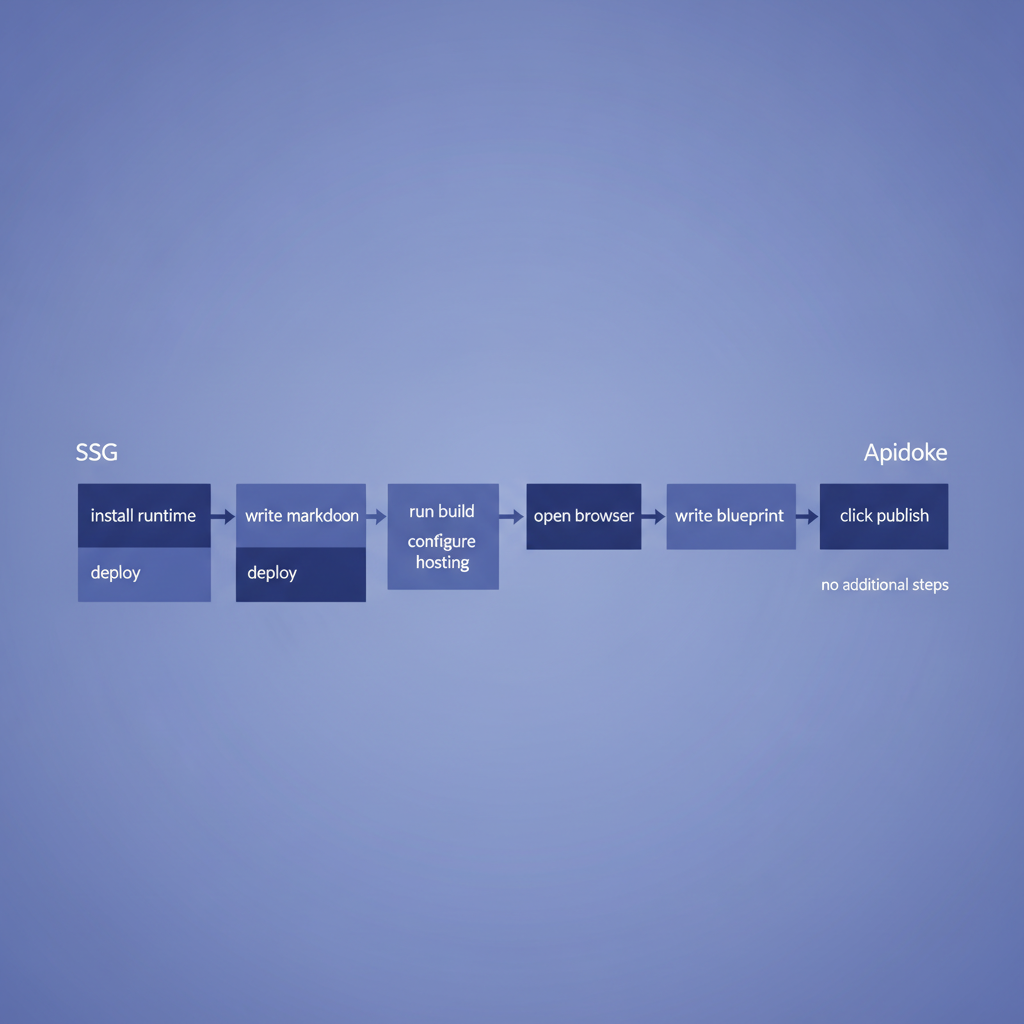
- SSGs require a local build pipeline (Node, Ruby, or Go), version control, and a hosting service before your first page goes live.
- Apidoke publishes interactive API docs in minutes with no CLI, no npm install, and no server configuration.
- The key trade-off: SSGs offer unlimited design freedom but add significant toolchain overhead; Apidoke offers a purpose-built API reference format with a live try-it console out of the box.
- Self-hosting is available on both sides, but only Apidoke bundles per-project version history without extra plugins.
What is a static site generator for API docs?
A static site generator processes source files at build time and outputs plain HTML, CSS, and JavaScript that any web server can serve. There is no application server, no database, and no runtime rendering. For API documentation specifically, teams typically write content in Markdown, wire in a theme or plugin, and commit everything to a Git repository that triggers a CI/CD pipeline on each push.
The appeal is real: you get version control, pull-request reviews, and full control over the HTML output. The cost is equally real: every contributor needs the right runtime installed, and every customization requires either a plugin or a custom theme component.
Docusaurus for API documentation
Docusaurus (built by Meta, currently at v3) is a React-based SSG primarily aimed at documentation sites. It supports MDX (Markdown with embedded JSX), a versioned docs system, and a plugin ecosystem.
What Docusaurus does well
- The built-in docs versioning cuts a new snapshot of your entire
/docsdirectory per release, which works well for changelogs and multi-version reference. - MDX lets you embed React components inline, so you can render code tabs or custom callouts without leaving Markdown.
- The active community means most common requirements (Algolia search, OpenAPI rendering via docusaurus-plugin-openapi-docs) have published plugins.
Where Docusaurus creates friction for API teams
Docusaurus is a general documentation tool, not an API reference tool. To get a usable API reference, you need a third-party plugin, a spec file in OpenAPI or Swagger format, and a working Node.js environment (v18 or higher as of Docusaurus 3). A typical setup requires running npm install, configuring docusaurus.config.js, choosing a theme, and deploying to Netlify, Vercel, or your own server. That is fine for a team with a dedicated developer relations engineer. It is a significant barrier for a small backend team that just needs its API documented.
There is also no built-in try-it console. If you want live HTTP requests from the docs page, you add another plugin, which adds another dependency.
Jekyll for API documentation
Jekyll is a Ruby-based SSG and was the original GitHub Pages default. Many teams still use it because GitHub Pages serves Jekyll sites without any build step configuration.
What Jekyll does well
- Zero-cost hosting on GitHub Pages with automatic builds on push to the default branch.
- Liquid templating is approachable for non-engineers who are comfortable with HTML.
- A large library of open-source themes includes several tailored to API reference, such as Just the Docs.
Where Jekyll creates friction for API teams
Jekyll requires Ruby and Bundler. On a fresh macOS or Linux machine the setup is roughly five commands. On Windows it is considerably more involved. The bigger issue is that Jekyll has no native concept of API resources, HTTP methods, request bodies, or response codes. You handcraft every endpoint in Markdown, which means drift between the docs and the actual API is entirely manual to catch. There is no try-it console without embedding a third-party widget, and performance on large doc sites degrades noticeably compared to Hugo.
Hugo for API documentation
Hugo is a Go-based SSG known for its build speed. Sites with thousands of pages compile in under a second on typical hardware, which matters when your API has hundreds of endpoints.
What Hugo does well
- Genuinely fast builds, single binary with no runtime dependencies beyond the Hugo executable itself.
- Flexible content organization using taxonomies, which maps reasonably well to API groups and resource categories.
- Themes like Docsy (used by several major open-source projects) offer polished out-of-the-box styling.
Where Hugo creates friction for API teams
Hugo's template language (Go templating) has a steep learning curve. Partials, shortcodes, and front matter schemas require meaningful engineering investment to customize. Like Jekyll, Hugo has no built-in concept of an API resource or endpoint, and there is no try-it console. Teams typically embed Swagger UI or Redoc as an iframe to display an OpenAPI spec, at which point Hugo itself is doing very little of the heavy lifting for the actual API reference.
Side-by-side comparison
| Criterion | Docusaurus | Jekyll | Hugo | Apidoke |
|---|---|---|---|---|
| Local runtime required | Node.js 18+ | Ruby + Bundler | Go binary | None, browser only |
| API-native format | Plugin (OpenAPI) | Manual Markdown | Manual Markdown | API Blueprint natively |
| Built-in try-it console | No (plugin needed) | No | No | Yes, fires real HTTP requests |
| Live preview while editing | Hot-reload dev server | jekyll serve | hugo server | Split-pane CodeMirror, instant in-browser |
| One-click public publishing | No (needs deploy step) | GitHub Pages (semi-auto) | No (needs deploy step) | Yes |
| Per-project version history | Docs versioning plugin | Git history only | Git history only | Built-in |
| Self-hostable | Yes | Yes | Yes | Yes |
| Auth tokens in requests | N/A (no console) | N/A | N/A | Client-side only, never reach Apidoke servers |
| Setup time to first published page | 30 to 90 minutes | 20 to 60 minutes | 20 to 60 minutes | Under 5 minutes |
How API Blueprint authoring in Apidoke differs from SSG Markdown
SSGs treat API documentation as a subset of general documentation. You write prose, format it, and optionally attach a spec renderer. API Blueprint, the format Apidoke is built around, treats the API itself as the document. Every resource, action, and response is a first-class citizen in the file format. Consider a simple user retrieval endpoint:
# Group Users

## User [/users/{id}]

### Get a user [GET]

+ Parameters
    + id: 42 (number, required) - The user ID

+ Response 200 (application/json)

        {
          "id": 42,
          "name": "Ada Lovelace",
          "email": "ada@example.com"
        }

+ Response 404 (application/json)

        {
          "error": "not_found",
          "message": "No user with id 42 exists."
        }
That block describes the HTTP method (GET), the URI template (/users/{id}), the parameter type and requirement, and two response codes (200 and 404) with real JSON bodies. Apidoke parses this and renders it as a three-column page: navigation on the left, prose and parameter tables in the centre, and a try-it console on the right that sends a live GET request to whatever base URL you configure. No build step. No plugin. No deploy pipeline.
For a deeper look at the API Blueprint format itself, the complete guide to API Blueprint covers the full syntax, including MSON data structures, named examples, and authentication schemes.

When an SSG is still the right choice
SSGs are not the wrong tool universally. They make sense in several specific situations:
- You already have a large documentation site built on Docusaurus or Hugo and you want to add API reference pages as one section within a much larger site structure. Rebuilding everything is not worth it.
- Your docs need heavy custom branding that requires full React or Go templating control over every pixel of the output.
- Your team has dedicated developer relations engineers who are comfortable managing npm dependencies, CI pipelines, and Algolia search configuration.
- You are documenting a non-REST API, such as a GraphQL schema or a CLI, where the three-column API reference format does not fit naturally anyway.
When Apidoke is the faster path
Apidoke wins on speed and interactivity when these conditions apply:
- Your primary output is an API reference, not a general documentation site with tutorials, blogs, and marketing copy mixed in.
- You want a live try-it console without stitching together separate tools. The console in Apidoke fires real HTTP requests client-side, so authorization headers and Bearer tokens stay in the user's browser and never pass through Apidoke's infrastructure.
- Your team includes non-engineers, technical writers, or product managers who should be able to edit docs without installing a runtime or pushing to Git.
- You need per-project version history that is attached to the doc project itself, not just Git commits. Apidoke stores versions at the project level so you can restore or compare any prior state from the UI.
- You want to self-host without writing deployment scripts. Apidoke is designed to be self-hosted, and the published output is the same whether you use the hosted option or run it on your own infrastructure.
The full API documentation alternatives and comparisons hub covers Apidoke against purpose-built tools like Mintlify, ReadMe, Redocly, and Scalar if you want to extend the shortlist beyond SSGs.
The hidden cost of the SSG toolchain
One thing SSG comparisons rarely surface honestly: toolchain maintenance is a recurring cost, not a one-time setup cost. Node.js major versions break Docusaurus plugins. Ruby gem conflicts cause Jekyll builds to fail after a macOS upgrade. Hugo's template language changes occasionally between minor versions. Each of these events requires someone to spend time debugging a build system rather than improving the documentation itself.
The IETF HTTP Semantics specification (RFC 9110) defines the methods, status codes, and headers your API reference needs to cover accurately. The gap between that specification and what lands in your published docs is where real risk lives. A tool that reduces friction between writing and publishing reduces the chance that documentation falls behind the API.
The API Blueprint specification is an open standard, which means your content is never locked to Apidoke's rendering engine. You can store blueprints in Git alongside your code, check them into CI, or export them at any time.
A practical setup walkthrough for Apidoke
For teams coming from an SSG background, here is what the Apidoke workflow actually looks like:
- Create a project in the Apidoke browser UI. No CLI command. No configuration file.
- The built-in CodeMirror editor opens with a starter API Blueprint template. Edit the blueprint directly, or paste in an existing
.apibfile. - The split-pane live preview renders the three-column output in real time as you type. You see the navigation, the parameter tables, and the try-it console updating immediately.
- Set your API's base URL in the project settings. The try-it console uses this as the target for live requests.
- Click publish. Apidoke generates a public URL for the docs. No build pipeline, no hosting configuration.
- Every subsequent save creates a version snapshot. You can restore any prior version from the version history panel without touching Git.
Frequently asked questions
Can I migrate my existing SSG API docs to Apidoke?
Yes, if your existing docs are hand-written Markdown describing REST endpoints, converting them to API Blueprint is mostly a structural rewrite: each endpoint becomes a resource block with # Group, ## Resource [/path], and method-level sections. If your SSG is rendering an OpenAPI spec file, you would need to translate that spec into API Blueprint format manually, since Apidoke is built around the API Blueprint standard.
Does Apidoke support versioned API documentation the way Docusaurus does?
Apidoke includes per-project version history built into the UI. Every time you save, a snapshot is recorded and you can restore or compare versions without any additional plugin or Git workflow. Docusaurus requires its docs:version CLI command and copies the entire docs directory, which works differently and requires a redeploy for each version cut.
Do I need to know API Blueprint to use Apidoke?
The learning curve is low. API Blueprint uses a Markdown-like syntax and the Apidoke editor starts you with a working template. If you can write a numbered list in Markdown, you can write a basic API Blueprint resource block. The API Blueprint syntax cheat-sheet covers the full set of constructs in a single page.
How does the try-it console handle authentication tokens?
The try-it console in Apidoke fires requests directly from the user's browser. Authorization headers, Bearer tokens, and API keys are never sent to or stored on Apidoke's servers. The request goes from the browser straight to your API, the same as a Postman or curl request would.
Is Apidoke a good fit if my team already uses Hugo for non-API content?
If your API reference is one section within a large Hugo site that also contains blog posts, guides, and marketing pages, keeping Hugo for the broader site and using Apidoke for the API reference specifically is a practical split. Apidoke publishes to its own URL, so linking between the two is straightforward. If the entire site is API reference, switching entirely to Apidoke removes a significant amount of build configuration.
Ready to skip the toolchain and publish your first interactive API reference? Create a free Apidoke account and have a live, try-it-enabled API doc page in under five minutes.