
API Mock Server: How to Use Mocks to Test Your API Docs

An API mock server is a lightweight HTTP server that reads your API description file and returns pre-defined responses, letting you validate that your documentation is accurate before a real backend exists or before you touch production. With API Blueprint files and a tool like Drakov, you can stand up a local mock in under a minute, fire real HTTP requests against it, and instantly surface mismatches between what your docs promise and what an implementation returns. Apidoke's built-in live try-it console extends this workflow by letting your readers do the same from published documentation, in the browser, with no setup.
- A mock server serves responses directly from your API Blueprint document, so your docs are the contract.
- Drakov is the most widely used API Blueprint-native mock server; it parses Blueprint files with Drafter and listens on a configurable port.
- Running mocks during doc authoring catches schema mismatches, missing status codes, and wrong Content-Type headers before they confuse consumers.
- Apidoke's try-it console lets published API docs double as a live sandbox, firing actual HTTP requests so readers can test endpoints without leaving the page.
What is an API mock server, exactly?
A mock server (sometimes called a stub server or API simulator) sits in front of your real service and answers requests according to a contract file. When a client sends GET /users/42, the mock reads the matching response example from your Blueprint and returns it, typically with a 200 OK and whatever JSON body you wrote in the doc. The backend never sees the request.
This is distinct from a test double used inside a unit test. A mock server is a real HTTP process. You can point curl, Postman, or a frontend app at it and get real TCP connections, real status codes, and real headers. That fidelity is what makes mocks useful for validating documentation: if the request you described in the Blueprint returns the wrong status code, you know your doc is wrong, not your server.
The two most common use cases for API Blueprint mocks are:
- Design-first development: write the Blueprint, share the mock URL with frontend teams, and let them integrate while backend engineers build the real service in parallel.
- Documentation validation: run the mock alongside your test suite, send the same requests your docs show, and assert the responses match your documented examples.
API Blueprint and Drakov: the core toolchain
API Blueprint is a Markdown-based format for describing REST APIs. Each endpoint is described with a ## Resource heading, one or more ### Action blocks, and + Request / + Response sections that carry real headers, status codes, and body examples. You can read a full syntax reference in the official API Blueprint specification. For a quick refresher, the API Blueprint syntax cheat-sheet on this site covers the structures you will use most often.
Drafter is the reference parser for API Blueprint; it converts .apib files into an Abstract Syntax Tree (AST) that other tools consume. Drakov wraps Drafter and starts an Express-based HTTP server that routes incoming requests to the matching Blueprint action and returns the documented response. It is open source, runs on Node.js, and requires no configuration file beyond the path to your .apib file.
Installing Drakov
npm install -g drakovThat installs the drakov CLI globally. Node.js 14 or later works well; earlier versions may have Drafter compilation issues on some platforms.
Writing the Blueprint that will drive your mock
The quality of your mock depends entirely on the quality of your Blueprint. Here is a minimal but realistic example for a users endpoint:
FORMAT: 1A
HOST: https://api.example.com

# Example API

## Group Users

## Users Collection [/users]

### List Users [GET]
Returns a paginated list of users.

+ Response 200 (application/json)

        {
          "data": [
            { "id": 1, "name": "Alice", "email": "alice@example.com" },
            { "id": 2, "name": "Bob",   "email": "bob@example.com"  }
          ],
          "page": 1,
          "per_page": 20,
          "total": 2
        }

## User [/users/{id}]

+ Parameters
    + id: `42` (number, required) - Numeric user ID

### Get User [GET]

+ Response 200 (application/json)

        {
          "id": 42,
          "name": "Alice",
          "email": "alice@example.com"
        }

+ Response 404 (application/json)

        {
          "error": "user_not_found",
          "message": "No user with that ID exists."
        }

### Delete User [DELETE]

+ Request (application/json)

    + Headers

            Authorization: Bearer <token>

+ Response 204

+ Response 401 (application/json)

        {
          "error": "unauthorized",
          "message": "A valid Bearer token is required."
        }
A few things to notice. The HOST directive does not affect the mock server's bind address; Drakov uses its own port. The + Parameters block documents the {id} path variable. The DELETE action documents both 204 (success, no body) and 401 (missing auth), which is exactly the kind of multi-response branching that a mock lets you exercise explicitly.
For a deeper look at request and response body syntax, including nested MSON data structures, see the API Blueprint request and response bodies guide.
Starting the mock server and sending requests
Save the Blueprint above as api.apib, then run:
drakov -f api.apib --port 3000Drakov prints the routes it has registered and starts listening. Now test each documented action:
List users (GET /users)
curl -i http://localhost:3000/usersExpected response:
HTTP/1.1 200 OK
Content-Type: application/json

{
  "data": [
    { "id": 1, "name": "Alice", "email": "alice@example.com" },
    { "id": 2, "name": "Bob",   "email": "bob@example.com"  }
  ],
  "page": 1,
  "per_page": 20,
  "total": 2
}
Get a specific user (GET /users/42)
curl -i http://localhost:3000/users/42Drakov matches the /users/{id} pattern and returns the first documented response (200). To test the 404 branch, Drakov supports a Prefer header convention: Prefer: status=404. This lets you exercise every documented status code without changing the URL.
curl -i -H "Prefer: status=404" http://localhost:3000/users/99Delete a user (DELETE /users/42)
curl -i -X DELETE \
     -H "Authorization: Bearer test-token" \
     http://localhost:3000/users/42
Without the Authorization header you will get a 401; with it you get a 204 with an empty body. Both branches are worth testing because they confirm your documentation covers the right error conditions.
Comparing mock server tools for API Blueprint
| Tool | Input format | Protocol | Language | Best for |
|---|---|---|---|---|
| Drakov | API Blueprint (.apib) | HTTP | Node.js | Blueprint-native local mocking, CI pipelines |
| API Blueprint Mock Server (abmock) | API Blueprint (.apib) | HTTP | Go | Lightweight binary, Docker-friendly |
| Apidoke try-it console | API Blueprint (via Apidoke) | HTTP (browser) | N/A (hosted) | End-reader testing of published docs, no local setup |
| WireMock | JSON stub files | HTTP/HTTPS | Java | Enterprise Java projects, advanced matching rules |
| Prism (Stoplight) | OpenAPI / Swagger | HTTP | Node.js | OpenAPI-first teams; not Blueprint-native |
The key point: Drakov is the right choice if your source of truth is an API Blueprint file. WireMock and Prism are capable tools, but they do not consume .apib files natively.
Using mocks to catch documentation errors
Running the mock manually is fine during initial authoring. In a real workflow you want the mock to run automatically so errors are caught before a pull request merges. Here is a practical approach using curl and shell exit codes:
- Start Drakov in the background during your CI job:
drakov -f api.apib --port 3000 & - Wait briefly for the process to bind:
sleep 2 - Send each documented request and assert the status code:
STATUS=$(curl -o /dev/null -s -w "%{http_code}" http://localhost:3000/users) if [ "$STATUS" != "200" ]; then echo "FAIL: GET /users returned $STATUS, expected 200" exit 1 fi - Repeat for every documented endpoint, including error branches via the
Prefer: status=NNNheader. - Stop Drakov when done:
kill $(lsof -t -i:3000)
This is a minimal contract test. If a developer changes the Blueprint (for example, renaming a field from email to email_address) but forgets to update the response example, the JSON assertion will fail and the pipeline stops before a bad doc ships.
Where the Apidoke try-it console fits in
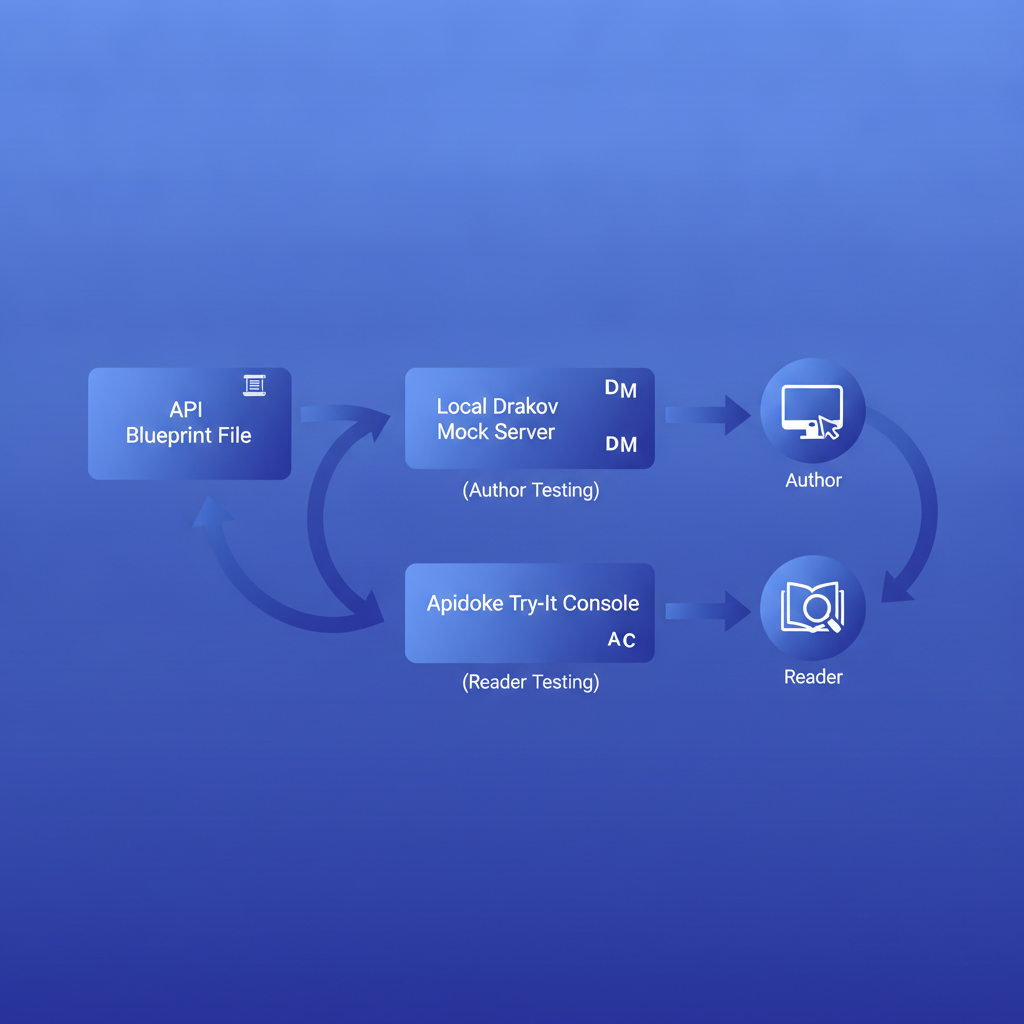
A local mock is for authors and CI pipelines. Your readers need something different: a way to test the real API from within the published documentation, without installing anything. That is what Apidoke's built-in try-it console provides.
When you publish an API Blueprint in Apidoke, every documented endpoint gets a live request panel in the 3-column viewer. The reader fills in path parameters, headers (including Authorization), and a request body, then clicks Send. The browser makes the real HTTP request directly to the host declared in your Blueprint. Credentials never leave the browser and never pass through Apidoke's servers, so API keys and Bearer tokens stay private.
The mock-server workflow and the try-it console are complementary. Mocks let you validate docs during authoring; the try-it console lets your consumers validate the real service after you publish. Together they close the loop: the Blueprint is both your documentation source and your testable contract at every stage of the API lifecycle.
Common mock server problems and how to fix them
Drakov returns 404 for a route you documented
Check that the URL template in your Blueprint exactly matches the path you are requesting. /users/{id} in the Blueprint matches /users/42 at runtime, but if you accidentally wrote /user/{id} (singular), every request to /users/42 will fall through to a 404. Also confirm Drakov has finished starting before you send the first request; a race condition in CI is a common cause.
The wrong response is returned for the same endpoint
When you document multiple response codes for one action, Drakov returns the first one by default. Use the Prefer: status=NNN request header to select a specific documented response code, as shown in the curl examples above.
Response body is empty even though the Blueprint has a body
This usually means the body in the Blueprint is not indented correctly. API Blueprint uses indentation to delimit body content inside a + Response block. Every line of the JSON must be indented by at least eight spaces (or two tabs) relative to the + Response line. A common mistake is indenting only four spaces, which Drafter interprets as a continuation of the description text rather than the body block.
CORS errors when calling the mock from a browser
Drakov does not add CORS headers by default. Start it with the --staticCors flag: drakov -f api.apib --port 3000 --staticCors. This adds Access-Control-Allow-Origin: * to every response, which is fine for local development and CI but should not be used as-is in production.
Integrating the mock workflow into API-first design
The mock server pattern maps naturally onto API-first development, where the API description is written before the implementation. You write the Blueprint, start the mock, share the URL with consumers, collect feedback, iterate on the design, then build. Because Apidoke tracks per-project version history, you can publish incremental Blueprint drafts for review, roll back if feedback requires a redesign, and keep a clear record of every contract change. Each version in Apidoke is a standalone snapshot your team can read and test, not just a diff in a git log.
The HTTP specification (RFC 9110) defines the semantics that your mock and your real service must both honor: safe vs. unsafe methods, idempotency, status code meanings, and header rules. Reviewing your Blueprint against these semantics while the mock is running is a fast way to catch design mistakes, like using GET for a state-changing operation, before they calcify into a production API.
Frequently asked questions
Does an API mock server need a real backend to work?
No. A mock server like Drakov reads only your API Blueprint file and serves the documented responses directly. There is no real backend involved; that is the point. You can run it locally or in CI long before any backend code is written.
What is the difference between a mock server and a sandbox environment?
A sandbox is a deployed instance of the real service configured to accept test data; it runs your actual backend code. A mock server serves static response examples from a description file and never runs your backend logic. Mocks are cheaper and faster to spin up; sandboxes are more accurate because they exercise real business logic.
Can I use Drakov with Apidoke?
Yes. You author the same .apib file in Apidoke's CodeMirror editor, then download it and point Drakov at it for local mock testing. The Blueprint you test locally is identical to the one Apidoke publishes, so the mock and the published docs stay in sync automatically.
How do I test a POST request against a Drakov mock?
Document a + Request (application/json) block with a body example inside your ### Create User [POST] action, then send: curl -i -X POST -H "Content-Type: application/json" -d '{"name":"Carol"}' http://localhost:3000/users. Drakov returns the first documented response for that action regardless of the request body content; it does not validate the incoming JSON against your schema.
Does Apidoke's try-it console send requests through Apidoke's servers?
No. Every request in the try-it console is fired directly from the reader's browser to the API host declared in the Blueprint. Apidoke's servers are not in the request path, which means API keys, Bearer tokens, and any other credentials stay entirely in the browser and are never logged or stored by Apidoke.
Ready to publish an API Blueprint and give your readers a live try-it console alongside it? Create a free Apidoke account and have your first interactive API doc live in minutes, no credit card required.