
Developer Experience: A Practical Guide for API Teams

Developer experience (DX) is the sum of every interaction a developer has with your API: finding the reference, reading the docs, running a first request, handling an error, and knowing what changed in the latest version. Apidoke is built around the idea that most of that experience lives inside the documentation itself, and that fixing the docs is the highest-leverage DX investment most API teams can make.
- DX is measurable: time-to-first-successful-call, support ticket volume, and doc page bounce rate are all leading indicators.
- The reference doc is the product interface developers interact with most; a try-it console that fires real HTTP requests cuts onboarding time more than any other single change.
- Apidoke publishes a live, 3-column API reference (navigation, content, and a browser-side try-it console) from an API Blueprint file, with no build pipeline required.
- Self-hosting and client-side request execution mean auth tokens never reach Apidoke servers, which removes the security objection that kills adoption of hosted consoles at security-conscious companies.
What developer experience actually means for an API team
The phrase gets used loosely. For internal platform teams it sometimes means CI/CD ergonomics or SDK quality. For API-as-a-product companies it usually means the public onboarding funnel. For both, the documentation is the shared critical path.
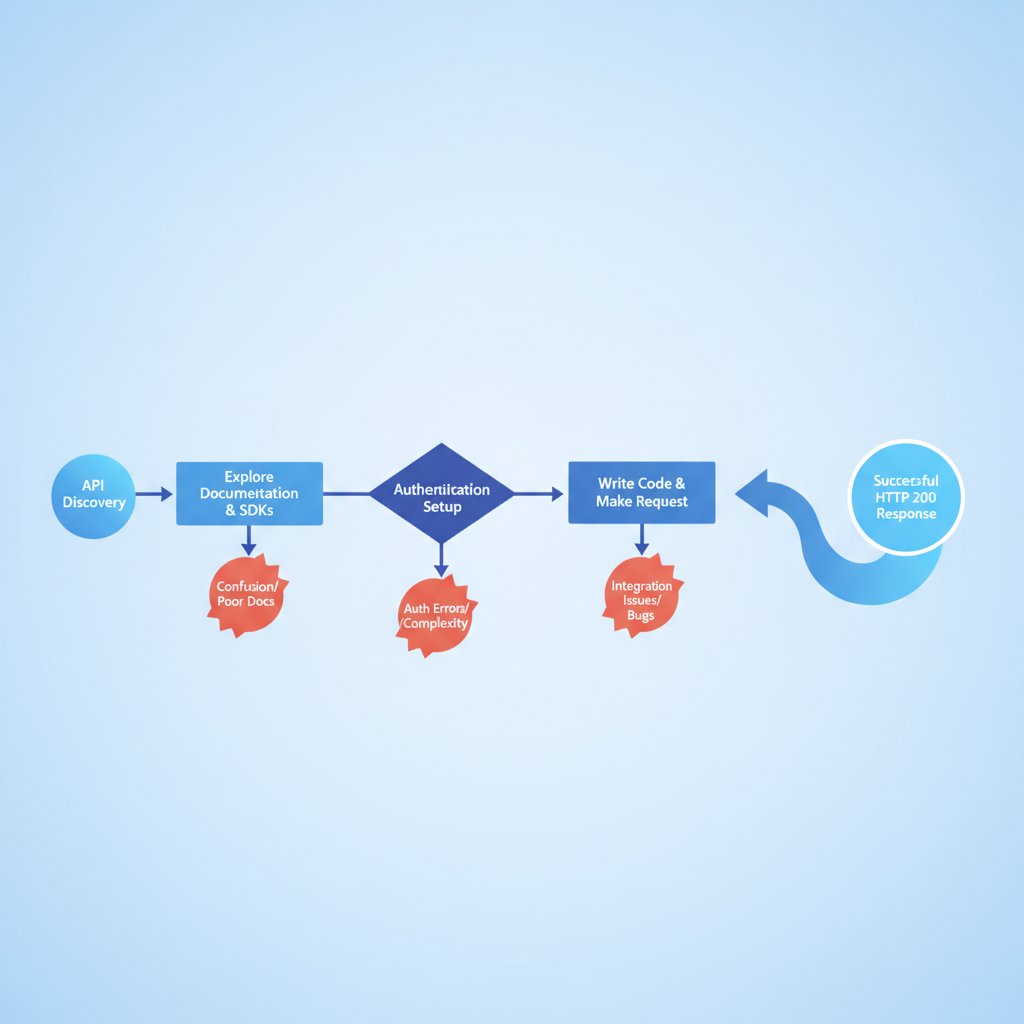
A useful working definition: DX is the friction a developer encounters between "I want to use this API" and "I shipped something that works." Every unnecessary step in that path is a DX defect, the same way a 500 status code is a reliability defect. The IETF HTTP semantics specification (RFC 9110) defines what correct HTTP behavior looks like at the protocol level; your documentation is the layer that explains what your specific API does within those rules.
The four layers of API developer experience
| Layer | What it covers | Primary DX signal |
|---|---|---|
| Discoverability | Can developers find the API and understand its scope in under two minutes? | Organic search traffic to the reference; time on landing page |
| Comprehension | Do the docs explain authentication, base URL, and every endpoint clearly? | Support tickets asking questions already answered in the docs |
| Activation | Can a developer make a successful call without leaving the browser? | Time-to-first-successful-call (TTFSC) |
| Continuity | Do developers know about breaking changes before they break? | Incidents caused by undocumented API changes |
Why the reference doc is the most important DX artifact
Tutorials and guides matter. Changelogs matter. But the API reference is where developers spend the most time, because they return to it on every integration task. A poorly structured reference forces developers to context-switch to Postman, curl, or a colleague's Slack message just to answer basic questions like "what fields does this endpoint accept?" or "what does a 401 look like versus a 403?"
A 401 Unauthorized response means the request lacks valid credentials (or the token expired). A 403 Forbidden means the credentials are valid but the caller does not have permission for this resource. These are different problems requiring different fixes, and developers should be able to read that distinction directly in the reference without guessing.
The reference docs article in this cluster goes deeper on the difference between reference docs and tutorial docs and how to choose the right type for each audience.
How to measure developer experience (concretely)
"We have bad DX" is a feeling. These are numbers:
- Time-to-first-successful-call (TTFSC): Start a timer when a new developer reads your landing page. Stop it when they receive a 200 OK from your API for the first time. Under 15 minutes is good. Under 5 minutes is excellent. Over 30 minutes indicates a structural DX problem.
- Doc-answerable support ticket rate: What percentage of support tickets ask questions that your docs already answer? A high rate means the answer exists but is not findable or not clear enough.
- Authentication drop-off: How many developers who start the onboarding flow never complete authentication? This is almost always a docs problem, not an auth problem.
- Try-it console usage rate: If your docs expose a try-it console, what share of visitors use it? A low rate often means the console is too buried or requires too much setup before the first call.
The try-it console: single biggest DX improvement most teams can ship
A try-it console (sometimes called an "API explorer" or "interactive API reference") lets a developer fill in parameters, supply an auth token, and send a real HTTP request from inside the documentation page. The response appears immediately, with status code, headers, and body, without any tool installation.
This matters because the single largest drop-off in API onboarding happens between "reading the docs" and "running the first request." Setting up Postman, finding the right collection, figuring out environment variables, and correctly formatting a bearer token header takes 10 to 20 minutes even for an experienced developer. A working in-browser console collapses that to under two minutes.
Apidoke's try-it console executes requests client-side: the HTTP call goes directly from the developer's browser to your API server. The auth token and any request data never pass through Apidoke's servers. This is a meaningful security property because it means a developer can safely enter a real (scoped) token to test a real endpoint, rather than inventing a fake one and getting a 401 that teaches them nothing.
For a deeper look at how interactive consoles work under the hood, see what makes API docs interactive and how try-it consoles work.

Writing documentation that actually improves DX
Good DX documentation has three properties: it is accurate, it is complete, and it is structured so that developers can find what they need without reading everything. Most teams nail accuracy (eventually) but fail at completeness and structure.
Write the error contract, not just the happy path
Every endpoint should document every response code it can return. Not just 200. At minimum, document:
- 200 OK (or 201 Created for a POST that creates a resource) with a real example response body
- 400 Bad Request, with the validation errors your API actually returns and an example body
- 401 Unauthorized, with the exact error message and a note on token expiry
- 404 Not Found, and whether this endpoint uses 404 to signal a missing resource vs. a wrong path
- 422 Unprocessable Entity if your API uses it for semantic validation errors (as opposed to malformed JSON)
- 429 Too Many Requests, with your rate-limit headers (X-RateLimit-Limit, X-RateLimit-Remaining, Retry-After)
- 500 Internal Server Error, even if only to say "contact support with the request ID"
In API Blueprint format, documenting multiple responses for a single endpoint looks like this:
## Create User [POST /users]

+ Request (application/json)

    + Body

            {
              "email": "ada@example.com",
              "role": "viewer"
            }

+ Response 201 (application/json)

    + Body

            {
              "id": "usr_01hx",
              "email": "ada@example.com",
              "role": "viewer",
              "created_at": "2026-07-15T10:22:00Z"
            }

+ Response 400 (application/json)

    + Body

            {
              "error": "validation_failed",
              "message": "'email' must be a valid email address",
              "field": "email"
            }

+ Response 401 (application/json)

    + Body

            {
              "error": "unauthorized",
              "message": "Bearer token is missing or expired"
            }
When this file is loaded into Apidoke, each response code appears as a selectable tab in the published reference. A developer can read all possible outcomes before writing a single line of integration code, which is the definition of good DX.
Provide real, copy-paste request examples
Invented placeholder data ("string", "your-api-key", "1234") is worse than no example at all, because it trains developers to ignore the example block. Use realistic data shapes that match the types and constraints your API actually enforces. If your user ID is a ULID like usr_01hx9q2kfbgmy1cxs5p3jd7n, show that exact format, not "id": 1.
Document authentication once, link everywhere
Authentication instructions should live in one canonical place (a dedicated "Authentication" section at the top of your reference), and every endpoint that requires auth should link back to it. Do not repeat the full auth instructions on every endpoint; do not omit them entirely. A developer who lands on a deep-linked endpoint page and cannot immediately answer "how do I authenticate this call?" will leave.
API versioning as a DX practice
Breaking changes without notice are the single most damaging DX event an API team can cause. A developer's integration stops working on a Friday afternoon because of an undocumented field removal is a DX catastrophe that destroys trust in ways that take months to repair.
Good versioning practice has two components: a versioning scheme (URL-path versioning like /v1/users and /v2/users is the most common and most discoverable) and a changelog that explains what changed and when. The changelog is the documentation layer of versioning; the version scheme is the API design layer.
Apidoke stores per-project version history so that older published versions of your reference remain accessible to developers who have not yet migrated. A developer on v1 can read the v1 reference; a developer evaluating v2 can read the v2 reference and compare. This is not a substitute for a changelog, but it prevents the common failure mode where upgrading the docs breaks the experience for users of the previous version.
The versioning strategies post in this cluster covers the full decision tree for API versioning approaches and how to document them.
The self-hosting argument for DX-conscious teams
Self-hosting API documentation is a DX decision as much as an infrastructure decision. Teams that self-host can:
- Serve docs from the same domain as their developer portal, keeping the context intact
- Control availability independently (no dependency on a third-party SaaS uptime for their docs)
- Satisfy security or compliance requirements that prohibit routing API credentials through external services
Apidoke ships as a self-hostable application. You run it on your own infrastructure, your docs live under your control, and the try-it console sends requests directly from the browser to your API, not through Apidoke's servers. No credit card is required to get started.
A step-by-step DX audit for an existing API
- Run the TTFSC test. Ask someone unfamiliar with your API to make a successful authenticated GET request using only your public documentation. Time it. Do not help them.
- Audit your error coverage. List every endpoint. For each one, check whether 400, 401, 404, and 429 responses are documented with real example bodies. Mark any gaps.
- Check your auth instructions. Find the authentication section. Is it one click from every endpoint page? Is it accurate? Does it show a real (obfuscated) token format?
- Review your changelog. When was the last breaking change? Is it documented? Does the changelog entry explain the migration path or just state what changed?
- Test your try-it console. If you have one, run five different requests through it: one that succeeds, one with a missing required field (400), one with an expired token (401), one to a resource that does not exist (404), and one that checks a rate-limited endpoint. Does the console return useful responses for all five?
- Read your support tickets. Categorize the last 20. How many could have been resolved by a documentation fix? That number is your DX debt estimate.
- Prioritize by TTFSC impact. Fix the single blocker that most lengthens the time from first read to first 200 OK. That is almost always either authentication docs or the absence of a working request example.
Common DX mistakes and what to do instead
| Mistake | Why it hurts DX | Fix |
|---|---|---|
| Documenting only 200 responses | Developers write code that cannot handle real failures | Document every response code the endpoint can return, with example bodies |
| No working request examples | Developers spend time constructing the request shape instead of integrating | Include a real, copy-pasteable curl example or JSON body for every POST and PUT |
| Versioning the API but not the docs | Developers on v1 read v2 docs and get confused about fields that do not exist yet | Publish separate versioned docs; use Apidoke's per-project version history to keep old versions live |
| Auth instructions buried or missing | Developers cannot make any call until they solve auth; every extra minute here destroys TTFSC | Place a dedicated Authentication section at the top of the reference with a real header example |
| No try-it console | Developers context-switch to external tools, losing the flow of reading and testing together | Use a tool with a built-in try-it console (Apidoke ships one by default) |
| Updating docs after shipping the change | Even a one-day lag causes support tickets and broken integrations | Treat doc updates as part of the definition of done for every API change, not a follow-up task |
How the API Blueprint format supports good DX workflows
API Blueprint is a Markdown-based format for describing REST APIs, maintained as an open specification. Because it is plain text, it lives naturally in version control alongside your API code. Pull requests against the .apib file are pull requests against the documentation, which means doc reviews happen in the same workflow as code reviews.
This matters for DX because the biggest structural cause of poor API documentation is that docs are decoupled from the development workflow. When updating the docs requires logging into a separate CMS or copying content into a web form, it gets skipped. When updating the docs is a git commit, it gets done.
Apidoke reads your API Blueprint file and renders the 3-column reference with the try-it console in place. The split-pane editor with live preview means you can see the published output as you write the Blueprint, which catches formatting errors before they reach the published reference.
Frequently asked questions
What is developer experience (DX) in the context of APIs?
Developer experience is the total friction a developer encounters between discovering your API and shipping a working integration. For APIs, the reference documentation, authentication flow, error clarity, and the availability of an interactive try-it console are the highest-impact DX factors.
How do I measure developer experience for my API?
The most actionable metric is time-to-first-successful-call (TTFSC): how long it takes a new developer to receive a 200 OK from your API using only your public documentation. Under 15 minutes is a reasonable target. Doc-answerable support ticket volume and authentication drop-off rate are good secondary signals.
Why does a try-it console improve developer experience?
A try-it console eliminates the tool-setup step between reading and testing. A developer can send a real HTTP request and see the real response, including status codes and error bodies, without leaving the docs page. This collapses the time between "I understand the endpoint" and "I know it works."
Is it safe to use a try-it console with real API tokens?
It depends on the implementation. Apidoke's try-it console executes requests client-side: the HTTP call goes from the developer's browser directly to your API server. Auth tokens are never sent to Apidoke's servers, so using a real (appropriately scoped) token is safe.
How does API versioning relate to developer experience?
Undocumented breaking changes are one of the most damaging DX events possible. Good versioning practice means publishing a clear changelog entry for every breaking change and keeping documentation for older versions accessible. Apidoke's per-project version history lets you publish new docs without removing the reference for developers still on the previous version.
Ready to cut your team's TTFSC in half? Start using Apidoke for free, no credit card required, and publish your first interactive API reference in minutes.
Related reading: Test API Endpoints in the Browser Without Postman
Related reading: API Documentation for Internal Teams: A Practical Guide