
What Is API Blueprint? (Complete Guide)

API Blueprint is an open-source, plain-text format for designing and documenting REST APIs, written in a superset of Markdown called MSON (Markdown Syntax for Object Notation). You describe your endpoints, request bodies, response codes, and headers in .apib files, and tools like Apidoke parse those files into a rendered, interactive reference that developers can read and test against in the browser. No code compilation, no separate schema registry, no YAML indentation headaches.
- API Blueprint uses Markdown, so any developer can read and edit it without learning a proprietary DSL or IDE plugin.
- The format is governed by an open specification maintained at apiblueprint.org, meaning your docs are not locked to any single vendor.
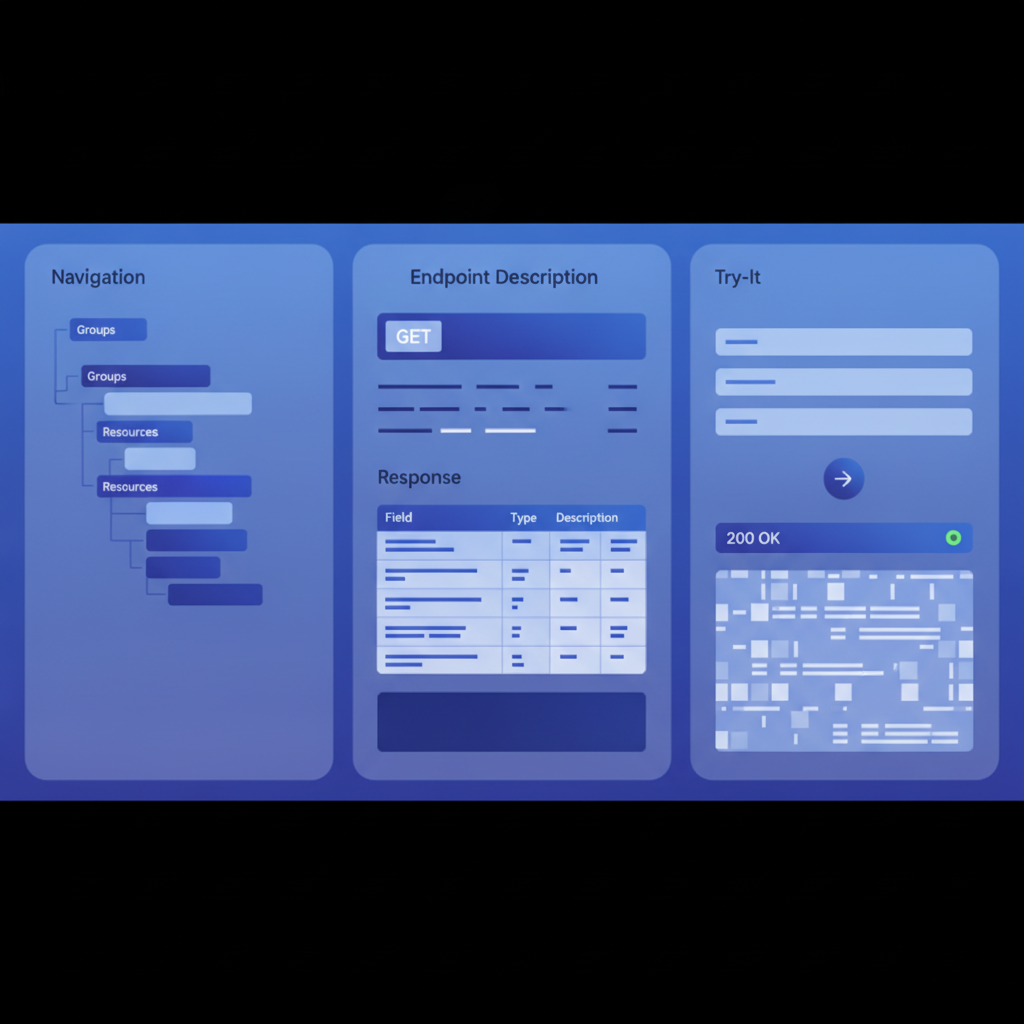
- Apidoke is natively built on API Blueprint, rendering a 3-column reference (navigation, content, live try-it console) directly from your
.apibsource with no intermediate build step. - Version history is built in, so every saved revision of your Blueprint is preserved per project and you can restore earlier drafts at any time.
What problem does API Blueprint solve?
Writing API documentation has historically split into two painful camps: heavyweight, code-generated docs that are accurate but unreadable, or hand-crafted prose that reads well but drifts out of sync with the actual API. API Blueprint sits in the middle. Because the source is plain Markdown, a product manager can draft it and a backend engineer can validate it. Because the format is machine-readable, tools can parse it and render it automatically.
The practical wins are:
- Your docs live as text files in the same Git repository as your code, so pull requests and code reviews include documentation changes.
- The format is human-writable without a special editor, though a split-pane live-preview editor (like the one inside Apidoke) makes authoring far faster.
- Because the spec is open, you are not dependent on any single SaaS vendor remaining in business or keeping your data accessible.
A plain-English explanation of the API Blueprint specification
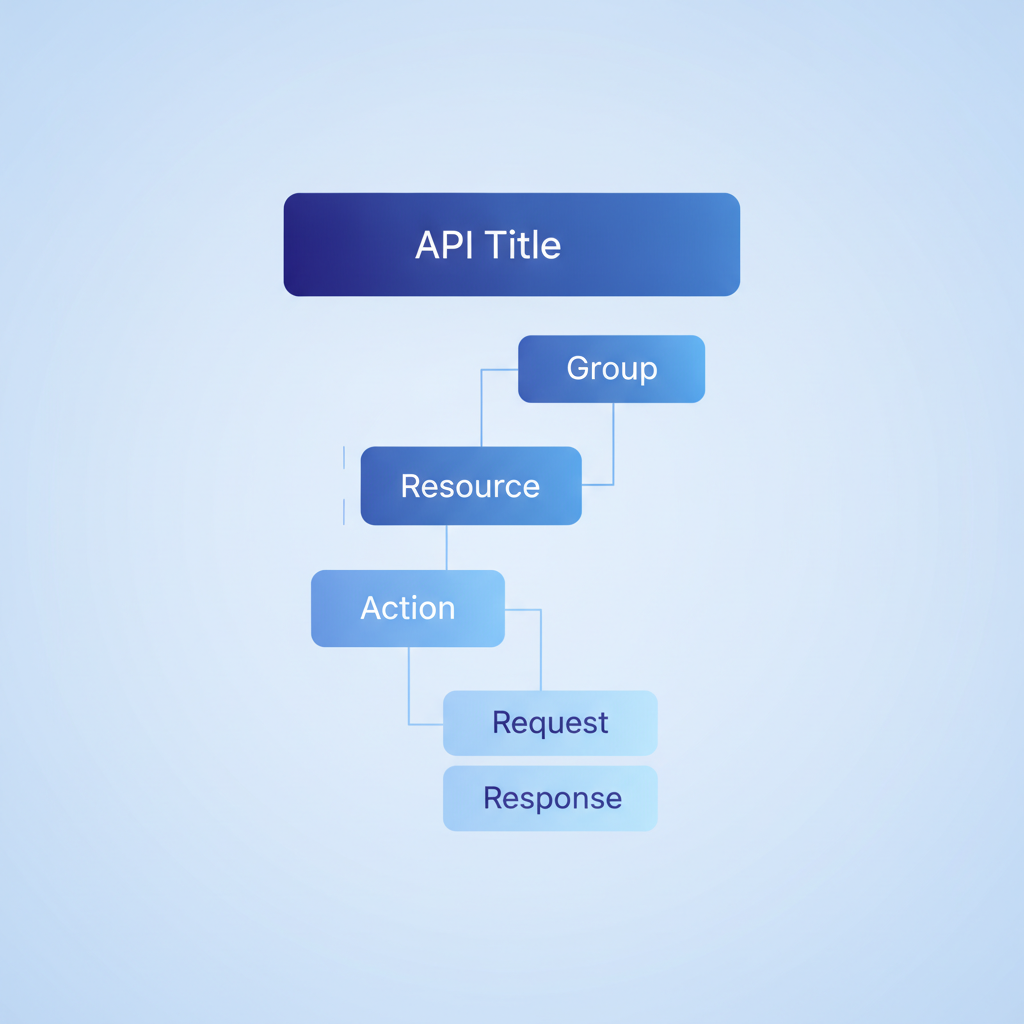
The API Blueprint specification defines a document hierarchy. At the top is a Markdown H1 that sets the API name and optionally a version. Below that, Resource Groups (H1 with the keyword Group) cluster related endpoints together in the navigation. Each endpoint is a Resource (H2) that declares a URI template. Under a Resource, each HTTP method is an Action (H3). Actions contain Request and Response blocks that hold headers, attributes, and body examples.
The hierarchy in words: API → Group → Resource → Action → Request / Response.
Core API Blueprint syntax with real examples
The API title and metadata
Every Blueprint file starts with a Markdown H1. The FORMAT keyword tells parsers which version of the spec to use. As of 2024, 1A is the current and only stable version.
FORMAT: 1A

# Bookstore API

A simple REST API for browsing and purchasing books.
Defining a Resource Group
A Group bundles related resources and appears as a collapsible section in the rendered navigation. Use # Group <Name>:
# Group Books

Resources related to books in the catalog.
Defining a Resource and an Action
A Resource is an H2 containing a URI template in square brackets. An Action is an H3 naming the HTTP method:
## Book Collection [/books]

### List All Books [GET]

+ Response 200 (application/json)

    + Body

            [
              {
                "id": 1,
                "title": "Designing Web APIs",
                "author": "Brenda Jin",
                "price": 34.99
              }
            ]
The indentation matters: the Body keyword is a list item nested inside the Response block. The actual JSON body is indented a further four spaces (12 spaces total from the left margin), which tells the parser it is a code block, not Markdown prose.
Adding a POST action with a request body
### Create a Book [POST]

+ Request (application/json)

    + Body

            {
              "title": "Clean Code",
              "author": "Robert C. Martin",
              "price": 29.99
            }

+ Response 201 (application/json)

    + Body

            {
              "id": 42,
              "title": "Clean Code",
              "author": "Robert C. Martin",
              "price": 29.99
            }

+ Response 400 (application/json)

    + Body

            {
              "error": "title is required"
            }
Notice that a single Action can declare multiple Response blocks, one per HTTP status code. Documenting 201 Created for success and 400 Bad Request for a validation failure in the same Action is not just good practice; it is what distinguishes a usable API reference from a stub. Per RFC 9110 (HTTP Semantics), 201 means a new resource was created and the server SHOULD include a Location header pointing to it.
URI parameters
URI templates follow RFC 6570. A path parameter is written in curly braces and then described in a Parameters section:
## Book [/books/{id}]

+ Parameters

    + id: `42` (number, required) - The unique integer ID of the book.

### Get a Single Book [GET]

+ Response 200 (application/json)

    + Body

            {
              "id": 42,
              "title": "Clean Code",
              "price": 29.99
            }

+ Response 404 (application/json)

    + Body

            {
              "error": "Book not found"
            }
Request headers and authentication
Headers go in a Headers section inside the Request block. This is where you document tokens, content types, and any custom headers your API requires:
### Delete a Book [DELETE]

+ Request

    + Headers

            Authorization: Bearer <token>

+ Response 204

+ Response 401 (application/json)

    + Body

            {
              "error": "Unauthorized"
            }
A 204 No Content response has no body by definition, so the block contains only the status code. A 401 Unauthorized response, per RFC 9110, indicates the client must authenticate before the server will respond. Showing both in your Blueprint means developers using Apidoke's try-it console immediately understand why a request is failing.
Data structures with MSON
Repeating a full JSON body in every endpoint is tedious and error-prone. MSON lets you define named data structures and reference them:
## Data Structures

### Book (object)

+ id: 1 (number, required)
+ title: `Designing Web APIs` (string, required)
+ author: `Brenda Jin` (string)
+ price: 34.99 (number, required)
You can then reference Book in a Response's Attributes section instead of pasting raw JSON everywhere. This keeps your Blueprint DRY (Don't Repeat Yourself) and makes schema changes a single-file edit.
API Blueprint vs OpenAPI: what is the real difference?
Developers evaluating documentation formats almost always compare API Blueprint and OpenAPI (formerly called Swagger). They solve the same problem but with very different design philosophies. The table below compares the most practical dimensions.
| Dimension | API Blueprint | OpenAPI 3.x |
|---|---|---|
| Source format | Markdown (.apib) | YAML or JSON (.yaml / .json) |
| Learning curve | Low; readable without training | Moderate; YAML indentation and $ref syntax take time |
| Tooling ecosystem | Smaller but focused | Very large; Swagger UI, Redoc, Stoplight, etc. |
| Schema definition | MSON or inline JSON examples | JSON Schema (inline or via $ref) |
| Narrative prose | First-class; Markdown flows naturally between definitions | Secondary; description fields support Markdown but YAML structure dominates |
| Version support | 1A (single stable version) | 3.1.x (with breaking changes from 2.x) |
| Apidoke native support | Yes, built-in | Not supported for import |
The short version: if your team already writes in Markdown and you want documentation that reads like a document rather than a config file, API Blueprint is a natural fit. If you need code generation, contract testing with a wide range of third-party tools, or integration with an existing OpenAPI workflow, OpenAPI's larger ecosystem may matter more to you.
How Apidoke renders an API Blueprint file
Apidoke is built specifically for API Blueprint. When you paste or type a .apib document into Apidoke's split-pane editor, the live preview on the right updates in real time, showing you exactly how the Groups, Resources, Actions, and Response examples will appear in the published 3-column reference. There is no build command to run and no CI/CD pipeline to configure.
The three columns of the published view are:
- Navigation panel (left): auto-generated from your Group and Resource headings, with anchor links so readers can jump directly to any endpoint.
- Content panel (center): the rendered descriptions, parameter tables, and request/response examples from your Blueprint source.
- Try-it console (right): a live HTTP client that fires real requests to your API's base URL. Any authorization tokens the developer enters stay in their browser and never pass through Apidoke's servers, which matters when documenting APIs that handle sensitive data.
When you are ready to share, one click publishes a public URL. Every time you save a new revision, Apidoke stores it in per-project version history, so you can restore any earlier draft or compare what changed between two releases. You can also self-host the entire platform if your organization cannot expose docs externally, which is a common requirement in regulated industries and enterprise environments. See the Apidoke setup and self-hosting documentation for full deployment steps.
What does a complete, minimal API Blueprint file look like?
Below is a self-contained Blueprint you can paste directly into Apidoke's editor to see all the core features working together. It covers a Group, two Resources, four Actions, URI parameters, request headers, and multiple response codes.
FORMAT: 1A

# Bookstore API

A minimal REST API for managing a book catalog.

# Group Books

## Book Collection [/books]

### List All Books [GET]

+ Response 200 (application/json)

    + Body

            [
              { "id": 1, "title": "Designing Web APIs", "price": 34.99 },
              { "id": 2, "title": "Clean Code", "price": 29.99 }
            ]

### Create a Book [POST]

+ Request (application/json)

    + Headers

            Authorization: Bearer <token>

    + Body

            {
              "title": "The Pragmatic Programmer",
              "price": 39.99
            }

+ Response 201 (application/json)

    + Body

            { "id": 3, "title": "The Pragmatic Programmer", "price": 39.99 }

+ Response 400 (application/json)

    + Body

            { "error": "title is required" }

+ Response 401 (application/json)

    + Body

            { "error": "Unauthorized" }

## Book [/books/{id}]

+ Parameters

    + id: `1` (number, required) - The unique integer ID of the book.

### Get a Book [GET]

+ Response 200 (application/json)

    + Body

            { "id": 1, "title": "Designing Web APIs", "price": 34.99 }

+ Response 404 (application/json)

    + Body

            { "error": "Book not found" }

### Delete a Book [DELETE]

+ Request

    + Headers

            Authorization: Bearer <token>

+ Response 204

+ Response 401 (application/json)

    + Body

            { "error": "Unauthorized" }
Common API Blueprint mistakes and how to fix them
Indentation errors that break parsing
The most frequent issue is inconsistent indentation. API Blueprint requires exactly four spaces (not tabs) inside list items, and body code blocks need eight or twelve spaces depending on nesting depth. If Apidoke's live preview shows a blank panel or unexpected raw text, count your spaces carefully. Most editors will reveal invisible characters if you enable whitespace rendering.
Forgetting to declare the content type
A Response without a content type in parentheses, for example + Response 200 instead of + Response 200 (application/json), will render without syntax highlighting in most viewers. Always specify the MIME type so readers and the try-it console know what to expect.
Missing the FORMAT header
Without FORMAT: 1A at the very top of the file, some parsers will reject the document or silently fail. It is a one-line addition that prevents hard-to-debug rendering failures.
Conflating Resource and Action descriptions
Description prose placed directly under an H2 Resource heading documents the resource as a whole. Prose placed under an H3 Action heading documents that specific HTTP method. Mixing these up produces docs where GET and POST share a description that belongs to only one of them.
Who should use API Blueprint?
API Blueprint is a particularly good fit when:
- Your team is already comfortable with Markdown and wants documentation to live in version control alongside code.
- You need a human-readable source that non-engineers (technical writers, product managers, QA) can contribute to without learning a schema language.
- You want to self-host your API reference without paying for a heavyweight SaaS platform.
- You are migrating away from a tool that used API Blueprint natively and need a replacement that understands the same format without conversion.
It is worth being direct about where API Blueprint is not the obvious choice: if you need to generate server stubs or client SDKs from your spec, or if your organization has already standardized on an OpenAPI workflow with validation pipelines, OpenAPI's ecosystem is broader and will be less disruptive to adopt. But for teams that prioritize readable, maintainable, human-first documentation, API Blueprint remains a practical and well-understood standard.
To go deeper on format comparisons and syntax deep-dives, visit the API Blueprint and Formats section of the Apidoke blog for articles covering adjacent topics in the format cluster.
Frequently asked questions
What file extension does API Blueprint use?
API Blueprint files use the .apib extension by convention. Some teams also use .md since the format is valid Markdown, but .apib is preferred because it signals to editors and tooling that the file should be treated as an API Blueprint document.
Is API Blueprint still actively maintained?
The specification is stable at version 1A and has not required breaking changes since its initial release, which is a sign of maturity rather than abandonment. The open-source parser ecosystem and tools like Apidoke continue to support it. Because the spec is open, your documents remain readable and portable regardless of any individual vendor's roadmap.
Can I use API Blueprint for non-REST APIs?
API Blueprint is designed specifically for HTTP-based REST APIs. It has no built-in support for GraphQL, gRPC, or WebSocket protocols. For those, you would need a different description format suited to the transport and interaction model involved.
How does the Apidoke try-it console handle authentication tokens?
When you enter an API key or Bearer token into Apidoke's live try-it console, that credential is stored in your browser's local session and sent directly from your browser to your API server. The token does not pass through Apidoke's infrastructure at any point, so your credentials remain private even when using the hosted version.
Do I need to install anything to use API Blueprint with Apidoke?
No. Apidoke provides a browser-based editor with live preview, so you write your .apib content directly in the interface and see the rendered output immediately. There is no CLI to install, no build pipeline to configure, and no local parser dependency to manage. Self-hosted deployments require setting up the Apidoke server, but the authoring experience itself remains entirely browser-based.
Ready to turn your first API Blueprint file into a live, shareable reference? Create your free Apidoke account and have your API docs published in minutes, no credit card required.
Related reading: API Blueprint and Formats: The Complete Category Hub
Related reading: API Blueprint Syntax Cheat-Sheet