
How to Write an API Style Guide for Your Team

An API style guide is a written agreement that tells everyone on your team how to name resources, phrase descriptions, format request and response examples, and handle edge cases consistently across your API documentation. In Apidoke, where you author docs in API Blueprint and publish a live three-column reference, a shared style guide is what prevents one author writing user_id while another writes userId and a third writes id for the same field.
- A style guide covers naming conventions, tone, capitalization, error language, and code-example format, not just aesthetics.
- Consistent docs reduce support tickets and onboarding time because developers can predict field names and error shapes before they read the full reference.
- API Blueprint's plain-text format makes style drift easy to spot in code review and easy to lint automatically.
- You can start with a single-page document and grow it incrementally; the first version does not need to cover everything.
Why teams need an API style guide
Most teams write their first API docs under deadline pressure. One engineer documents the POST /users endpoint, another picks up GET /accounts a sprint later, and a technical writer fills in the authentication section months after that. Without a shared reference, each author makes independent micro-decisions: whether to title groups in title case or sentence case, whether response descriptions start with a verb or a noun phrase, whether 404 Not Found responses always include a message field or sometimes include an error field. Those decisions accumulate into a reference that feels patchy and increases cognitive load on the developers reading it.
The cost is not just aesthetic. Inconsistent field naming across endpoints forces client developers to handle multiple shapes for what is logically the same concept. Inconsistent error bodies mean error-handling code has to branch on the endpoint rather than applying a single parser. RFC 9110, the HTTP semantics specification, deliberately leaves application-level error format open, which means teams must fill that gap themselves. An API style guide is how you fill it.
What an API style guide should cover
The following sections are the minimum viable scope for a style guide used with API Blueprint documentation. You do not need to write all of them on day one, but each one resolves a category of disagreement that teams reliably hit.
Resource and group naming
API Blueprint organizes endpoints into groups using the # Group heading. Decide upfront: are group names singular nouns (# Group User), plural nouns (# Group Users), or domain concepts (# Group Authentication)? A good default rule is plural nouns for collections, singular for singleton resources, and domain concepts for cross-cutting concerns like auth or webhooks.
For URL path segments, pick one casing convention and enforce it everywhere. The most common choice for REST APIs is lowercase kebab-case (/payment-methods), because URL paths are case-sensitive on most servers and kebab-case avoids the ambiguity of where word boundaries fall in a string like paymentmethods. Document that choice explicitly.
Field naming convention
JSON field names should follow one convention across the entire API. The two realistic options are camelCase (common in JavaScript ecosystems) and snake_case (common in Python and Ruby ecosystems). Whatever you pick, write it into the style guide with a brief rationale. Also document how to name boolean fields: prefer a verb prefix (isActive, hasAccess) rather than a bare adjective (active), because a boolean named active is easy to misread as a string status value.
Tense and voice for descriptions
API Blueprint lets you write description text in free prose anywhere in the document. Without a rule, authors drift between passive voice (The user is created), imperative (Create a user), and present-indicative (Creates a user). Pick one pattern for endpoint summaries and a separate pattern for field descriptions.
A clean default: endpoint summaries use imperative mood (Create a user, List payment methods, Delete a session), and field descriptions use a short noun phrase starting with what the field represents (Unique identifier for the user., ISO 8601 timestamp of when the record was created.). Using a period at the end of every field description is a minor detail that makes the rendered output look finished.
HTTP status codes and when to use them
Agree on which status codes your API uses and what each one means in your specific domain. A minimal mapping that most REST APIs need:
| Code | Meaning in your API | When to document a body |
|---|---|---|
| 200 OK | Successful read or update | Always; include the full resource shape |
| 201 Created | Resource created; Location header present | Always; return the created resource |
| 204 No Content | Successful delete or action with no body | Never; the response has no body |
| 400 Bad Request | Validation failure; client error | Always; include field-level error details |
| 401 Unauthorized | Missing or invalid credentials | Always; consistent error body |
| 403 Forbidden | Authenticated but not permitted | Always; consistent error body |
| 404 Not Found | Resource does not exist or is not visible | Always; consistent error body |
| 422 Unprocessable Entity | Valid syntax but semantic failure | Always; include which rule failed |
| 429 Too Many Requests | Rate limit exceeded | Always; include reset time |
| 500 Internal Server Error | Unexpected server fault | Always; generic message, no stack traces |
Documenting 401 vs 403 correctly matters. A 401 means the request lacks valid authentication credentials. A 403 means the credentials are valid but the caller does not have permission. Many APIs return 403 for both, which leaks authorization information. Your style guide should state the policy explicitly so every author documents the right code on the right endpoint.
Error response shape
Define one canonical error object and use it for every non-2xx response. A minimal shape that covers most needs:
{
  "error": {
    "code": "validation_failed",
    "message": "The request body contained invalid values.",
    "details": [
      {
        "field": "email",
        "issue": "Must be a valid email address."
      }
    ]
  }
}
code is a machine-readable snake_case string that client code can branch on without parsing the human-readable message. details is optional and present only when field-level context is available. Document this shape once in your style guide, then reference it in every error response block in API Blueprint rather than repeating the full description.
How to write this in API Blueprint
Below is a complete, self-consistent example that applies all of the style rules above. You can paste it directly into Apidoke's editor and see it render in the live preview pane.
FORMAT: 1A
HOST: https://api.example.com

# Example API

A short description of the API. One or two sentences, present tense.

# Group Users

## Users Collection [/users]

### List users [GET]

Returns a paginated list of user records.

+ Response 200 (application/json)

    + Body

            {
              "data": [
                {
                  "id": "usr_01J8K2",
                  "email": "ada@example.com",
                  "isActive": true,
                  "createdAt": "2026-03-12T10:00:00Z"
                }
              ],
              "meta": {
                "total": 1,
                "page": 1,
                "perPage": 20
              }
            }

### Create a user [POST]

Creates a new user record. Returns the created resource.

+ Request (application/json)

    + Body

            {
              "email": "grace@example.com",
              "isActive": true
            }

+ Response 201 (application/json)

    + Body

            {
              "data": {
                "id": "usr_01J8K3",
                "email": "grace@example.com",
                "isActive": true,
                "createdAt": "2026-09-01T14:22:00Z"
              }
            }

+ Response 400 (application/json)

    + Body

            {
              "error": {
                "code": "validation_failed",
                "message": "The request body contained invalid values.",
                "details": [
                  {
                    "field": "email",
                    "issue": "Must be a valid email address."
                  }
                ]
              }
            }

+ Response 401 (application/json)

    + Body

            {
              "error": {
                "code": "unauthenticated",
                "message": "A valid bearer token is required."
              }
            }
Notice the consistent patterns: camelCase field names, data wrapper for successful responses, shared error shape across 400 and 401, ISO 8601 timestamps, and imperative summaries on every action heading. Anyone who reads the style guide before writing a new endpoint will produce output that looks like it came from the same author.
Step-by-step: creating your style guide document
- Audit what you already have. Read through your existing API Blueprint files and list every naming pattern, status code, and response shape that appears more than once. Inconsistencies become visible quickly at this stage.
- Run a short decision meeting. Bring the two or three people who write docs most frequently. Present the inconsistencies you found and make a concrete decision for each one. Aim for a 45-minute timebox. Defer anything you cannot decide in that session.
- Write the first version as a Markdown or Blueprint file. Keep it short: a single page covering field naming, group naming, status codes, and error shape is enough to start. Add a
STYLE_GUIDE.mdfile to the same repository as your Blueprint source files so it lives next to the docs it governs. - Add examples for every rule. A rule that says use camelCase is less useful than a rule that says use camelCase for all JSON field names:
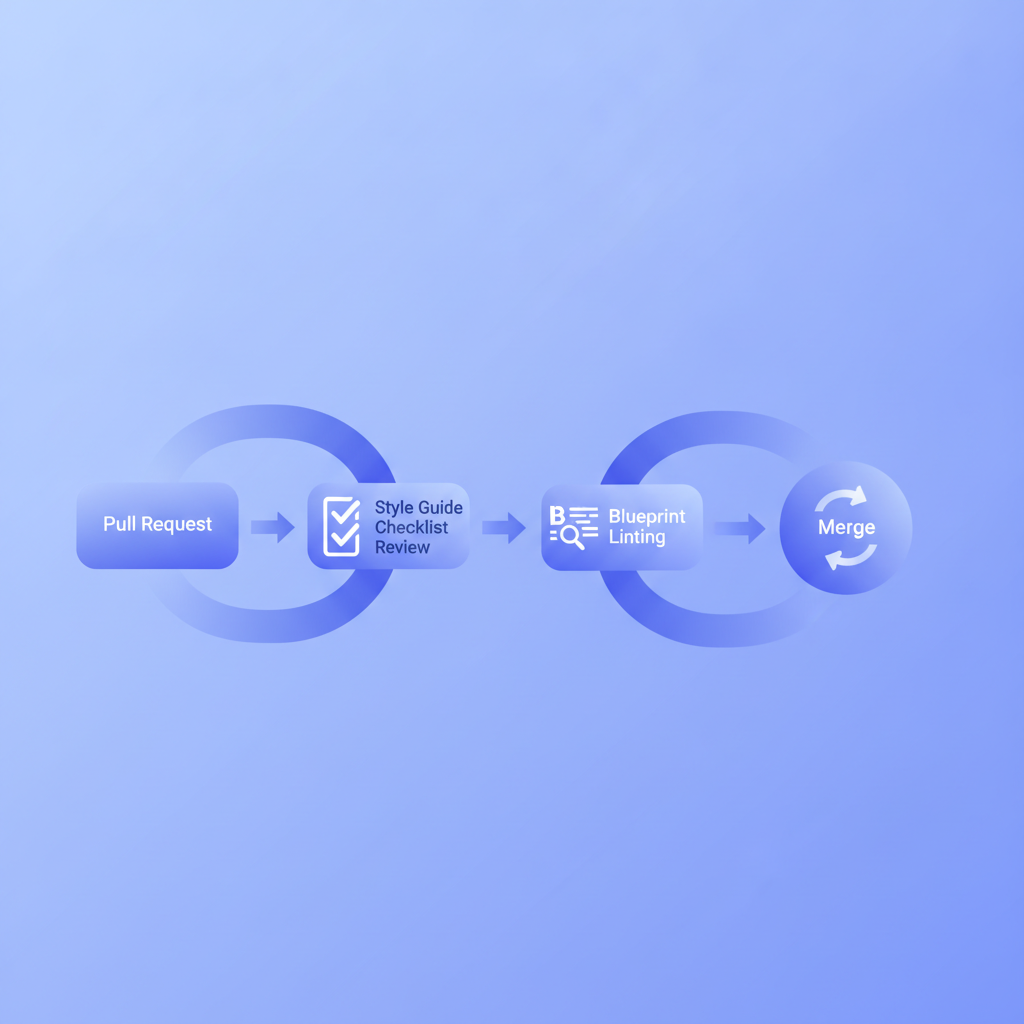
createdAtnotcreated_at,isActivenotis_active. Concrete examples reduce interpretation disputes. - Set up a lightweight review checklist. When a pull request adds or modifies an endpoint, reviewers should check: Does the group name follow the naming convention? Does the summary use imperative mood? Does every non-2xx response use the shared error shape? A checklist takes 30 seconds to run and catches most drift at review time rather than after publish.
- Publish the docs with version history turned on. Apidoke's per-project version history means you can snapshot the style guide itself alongside the API docs it applies to. If a rule changes, the old version of the docs still reflects the old rule, which is useful when supporting older API versions.
- Schedule a quarterly review. A style guide that does not evolve calcifies into rules no one follows because the API outgrew them. Put a 30-minute calendar block each quarter to check whether any new patterns have appeared that the guide does not cover.
Handling the most common edge cases
Versioned APIs and style guide drift
When you release v2 of an API and switch from snake_case to camelCase, you now have two legitimate conventions in play simultaneously. The right approach is to tag the style guide version alongside the API version. Keep a STYLE_GUIDE_v1.md and STYLE_GUIDE_v2.md in the same repo. This is consistent with how Apidoke's version history tracks doc snapshots per project, and it avoids the confusion of a single style guide trying to document contradictory rules for different API versions. The API versioning strategies guide covers the broader versioning decision in detail.
Descriptions for parameters vs fields
Query parameters and JSON body fields serve different roles and benefit from distinct description patterns. For query parameters in API Blueprint's + Parameters block, the description should state what the parameter filters or controls, its type, its default, and any valid values. For JSON body fields, the description should state what the field represents and any constraints on its value.
+ Parameters
    + status: `active` (string, optional) - Filter users by status. One of `active`, `inactive`, or `pending`. Defaults to all statuses.
    + page: `1` (number, optional) - Page number for pagination. Minimum: 1. Defaults to `1`.
The type declaration and the default value are part of the API Blueprint parameter syntax. The prose description adds the constraint and the intent. Without the prose, a developer cannot tell whether page: 0 is valid or whether status values are case-sensitive.
Authentication documentation conventions
Decide once how you document the Authorization header across all endpoints. Options include: document it as a parameter on every endpoint (verbose, but visible in the try-it console), document it once in a top-level section and reference it throughout (clean, but requires the reader to navigate), or use API Blueprint's named request pattern to define a reusable authenticated request. Your style guide should pick one and explain why. If you use Apidoke's live try-it console, note that auth tokens entered in the console stay client-side and never reach Apidoke's servers, which matters when documenting private or internal APIs.
Enforcing the style guide without manual review
Manual review catches most issues, but large teams benefit from at least one automated check. Dredd, the API Blueprint testing tool, validates that your live API matches the Blueprint you have written, which is a structural form of enforcement. For prose style, a linter like Vale configured with a custom vocabulary file can flag forbidden patterns like passive voice or non-imperative endpoint summaries in CI. Neither tool eliminates the need for the style guide itself, but they catch the regressions that slip through code review.
How Apidoke fits into a style-guided workflow
Because Apidoke uses API Blueprint as its single authoring format, a style guide for an Apidoke project is also a style guide for the format itself. The split-pane editor with live preview means authors can see whether a new endpoint renders correctly before committing. The three-column output (navigation, content, try-it console) makes visual inconsistencies immediately apparent: a group named in sentence case next to one in title case stands out in the navigation panel at a glance.
Per-project version history means the history of style decisions is implicit in the history of the docs. If someone asks why camelCase was chosen, you can look at the diff where the convention was first applied. That is not a substitute for a written style guide, but it provides archaeological evidence when the written record is missing.
For a broader look at how documentation quality and process fit together, the developer experience guide for API teams covers the full lifecycle from writing to publishing to measuring impact.
Frequently asked questions
What is an API style guide?
An API style guide is a written document that defines the conventions your team follows when writing API documentation: naming rules for fields and endpoints, tone and grammar for descriptions, which HTTP status codes to use and when, and the shape of error responses. It exists so that docs written by different people on different days read as if they came from a single coherent source.
How long should an API style guide be?
The first version should fit on a single page, covering the four or five decisions that cause the most inconsistency in your existing docs. A useful style guide that people actually read is more valuable than an exhaustive one that nobody consults. Grow it incrementally as new questions come up during reviews.
Who owns the API style guide?
In most teams the technical writer or documentation lead owns the document and update process, but the style decisions themselves should be made collaboratively with the engineers and tech lead who write the most endpoints. Sole ownership without engineering input produces rules that feel disconnected from how the API actually works.
Should the style guide be in the same repository as the API docs?
Yes, keeping a STYLE_GUIDE.md alongside your API Blueprint source files is the most practical approach. It means the style guide is versioned with the docs it governs, shows up in the same code review workflow, and is easy for a new contributor to find before they write their first endpoint.
How do you enforce an API style guide without slowing down the team?
Start with a short review checklist (three to five questions reviewers run on every PR that touches docs) rather than building automated enforcement first. Once the checklist is stable and the team has internalized the rules, selectively automate the checks that are tedious to verify manually, such as naming-convention pattern matching or presence of required response codes. Automation works best as a safety net for rules the team already agrees on.
If you want to put a style guide into practice with a tool that makes inconsistencies visible at a glance, create a free Apidoke account and start authoring your API Blueprint docs with live preview and built-in version history today.
Related reading: Writing Effective Code Samples for API Documentation
Related reading: API Documentation Review Checklist for Teams