
Apidoke vs Confluence: When a Wiki Is Not Enough for API Docs

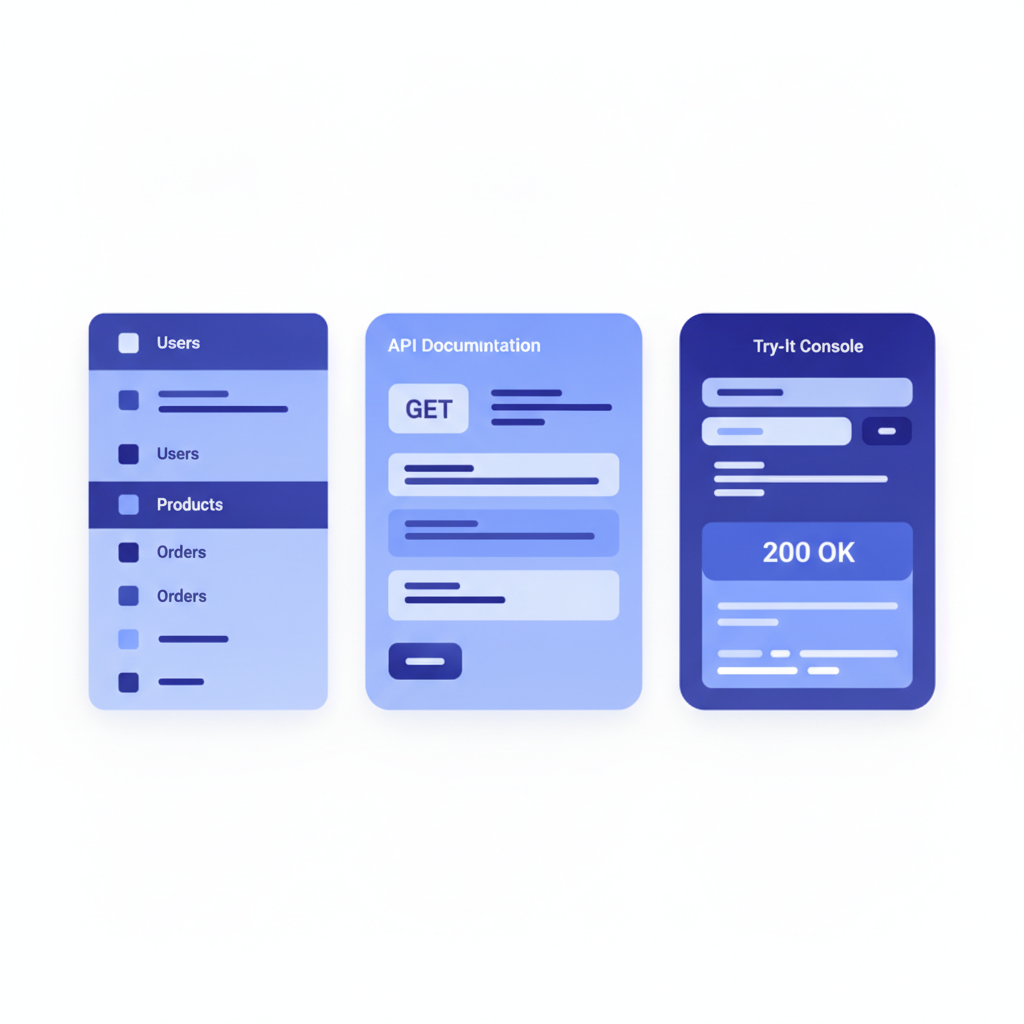
Apidoke vs Confluence comes down to one practical question: is a wiki good enough for API documentation? The short answer is no. Confluence is a general-purpose wiki built for prose pages and meeting notes; it has no concept of HTTP methods, response codes, or a live try-it console. Apidoke is purpose-built for API docs, giving teams a structured API Blueprint editor, a three-column interactive reference viewer, and per-project version history without any external toolchain.
- Confluence is a wiki; it stores text. Apidoke is an API documentation platform; it renders structured, interactive API references with a live try-it console.
- API Blueprint, the open standard Apidoke uses, enforces a machine-readable contract (resources, actions, request and response bodies) that a free-text wiki page cannot replicate.
- Apidoke is self-hostable with no credit card required, so your auth tokens never leave the browser and your data stays on your infrastructure.
- Confluence has no built-in way to fire a real HTTP request against an endpoint; Apidoke's try-it console does that natively, which cuts developer onboarding time significantly.
What teams actually use Confluence for API docs
At many mid-size companies the story goes like this: someone creates a Confluence space called "API Reference", adds a page per endpoint, and pastes in a curl example. It works for a week. Then the API changes, nobody updates the page, and the curl example quietly returns a 404 instead of a 200. Developers stop trusting the docs. Product managers start pinging engineers directly. The wiki becomes a liability rather than an asset.
Confluence was designed around unstructured pages and hierarchical nesting. That is perfect for runbooks, meeting notes, and onboarding guides. It is a poor fit for a machine-readable API contract because nothing in a Confluence page enforces that a response body field called user_id is actually an integer, or that the endpoint exists at all.
What dedicated API documentation actually needs
Before comparing the two tools directly, it helps to be specific about what an API reference must do that a wiki cannot:
- Describe every endpoint with its HTTP method (GET, POST, PUT, DELETE, PATCH), URI, path parameters, query parameters, request headers, and request body schema.
- Show at least one documented success response (typically 200 or 201) and the common error responses (400, 401, 403, 404, 422, 500), each with a real example body.
- Let a developer fire an actual request against the API from inside the documentation, with their own auth token, and see the real response.
- Keep versions in sync with the codebase, so v1 docs do not bleed into v2 docs.
None of those four requirements are native to Confluence. All four are core to Apidoke.
Head-to-head comparison
| Capability | Confluence | Apidoke |
|---|---|---|
| Structured API authoring format | None (free-form wiki pages) | API Blueprint (open standard, plain Markdown-like syntax) |
| Three-column interactive reference viewer | No | Yes (navigation, content, live try-it console) |
| Live try-it console (real HTTP requests) | No | Yes, client-side; auth tokens stay in the browser |
| Split-pane editor with live preview | No | Yes (CodeMirror-based) |
| Per-project version history | Page-level revision history only | Built-in per-project version snapshots |
| One-click public publishing | No (Confluence is primarily internal) | Yes |
| Self-hosting option | Confluence Data Center (expensive license) | Yes, free and open deployment |
| Enforced HTTP method and status code structure | No | Yes (API Blueprint spec requires it) |
| No credit card to get started | No (Atlassian account and workspace required) | Yes |
What API Blueprint gives you that a Confluence page never can
API Blueprint is an open specification maintained by Apiary (now Oracle) and documented at apiblueprint.org. It uses a Markdown-like syntax to describe API resources, actions, and example bodies in a machine-readable way. That machine-readable contract is the foundation of everything Apidoke renders.
Here is a minimal but complete API Blueprint snippet for a user retrieval endpoint, the kind of thing that would take five messy Confluence sections to approximate:
FORMAT: 1A
HOST: https://api.example.com

# User API

## Group Users

## User [/users/{user_id}]

### Get a user [GET]

+ Parameters
    + user_id: 42 (number, required) - Numeric ID of the user.

+ Response 200 (application/json)

        {
          "id": 42,
          "email": "ada@example.com",
          "role": "admin",
          "created_at": "2024-11-01T09:00:00Z"
        }

+ Response 401 (application/json)

        {
          "error": "unauthorized",
          "message": "A valid Bearer token is required."
        }

+ Response 404 (application/json)

        {
          "error": "not_found",
          "message": "No user with id 42 exists."
        }
Paste that into Apidoke's split-pane editor and you immediately see the three-column reference on the right: the endpoint in the navigation sidebar, the method and parameter table in the content column, and a try-it panel ready to fire a GET request. Paste the same text into Confluence and you get a code block with no rendering, no interactivity, and no structural validation.
To go deeper on API Blueprint syntax, the API Blueprint syntax cheat sheet covers every keyword with copy-paste examples.
The try-it console: where the gap becomes impossible to ignore
When a developer lands on an API reference, the first thing they want to do is fire a real request and see a real response. That instinct is backed by the HTTP specification itself: RFC 9110 defines the semantics of HTTP methods and status codes, and understanding them in practice, not just in prose, is how developers build confidence in an API.
Apidoke's try-it console fires real HTTP requests directly from the browser. The developer types in their own Authorization header value (a Bearer token or API key), hits Send, and sees the actual response body, status code, and headers returned by their server. Because the console is entirely client-side, the credentials never pass through Apidoke's servers. That is a meaningful security property that Confluence, which is not in the request path at all since it has no console, simply cannot offer by design.
Version history: why page-level revisions are not the same thing
Confluence has page history. If someone edits a page, you can click through revision diffs to see what changed. That is useful for prose documents. It is not useful for API versioning.
API versioning means your v1 endpoints and your v2 endpoints need to coexist as separate, navigable, complete references, often published at different URLs or under separate navigation trees. Apidoke stores per-project version snapshots, so you can maintain a live v1 reference and a live v2 reference side by side. If a developer is still on v1, they read the v1 docs. When they upgrade, they read v2. The two sets of docs do not interfere with each other.
Confluence has no native concept of this. Teams work around it by duplicating entire spaces, appending "v2" to page titles, or hoping that one master page with a giant "Deprecated" banner is enough. None of those workarounds scale past two or three people editing the docs simultaneously. For a full treatment of this topic, see the guide on versioning API documentation workflows.
When Confluence is actually the right choice
Being fair here matters. Confluence is an excellent tool for certain things. If your goal is to write an API onboarding guide, an architectural decision record, a runbook for incident response, or a team wiki that links to your API reference, Confluence does that well. Many teams use Confluence for internal prose docs and Apidoke for the actual API reference, and that combination works cleanly.
The problem arises when Confluence becomes the API reference itself, because then there is no structured format, no live console, no enforced version separation, and no way for a developer to trust that the page they are reading reflects the endpoint they are calling.
How to migrate your Confluence API pages to Apidoke
- Audit your existing Confluence pages. List every page that describes an endpoint: its method, URL, parameters, and example responses. Note which responses are documented (look for 200, 400, 401, 404 at minimum) and which are missing.
- Create an API Blueprint file. Open a text editor and add the FORMAT: 1A header followed by HOST: pointing to your API base URL. Add a # Group heading for each logical resource group.
- Convert each page to a resource and action. An endpoint like POST /orders becomes a resource block
## Orders [/orders]with an action block### Create an order [POST]. Add documented request and response bodies from your Confluence pages, filling in gaps where the wiki pages were incomplete. - Paste the blueprint into Apidoke. The split-pane CodeMirror editor gives you live preview on the right as you type. Spot-check that every resource renders correctly and that the try-it console correctly pre-fills the right method and URL.
- Publish with one click. Apidoke generates a clean public URL for the reference. Share that URL and archive the Confluence space rather than deleting it, so search history is preserved during the transition.
- Create a version snapshot. Once the initial reference is published, add a save comment such as "v1 baseline" in Apidoke, so you can find and restore that state later from version history.

What you give up when you move API docs out of Confluence
To set realistic expectations: there are real Confluence features that a dedicated API documentation tool does not try to replicate. Inline comments on specific paragraphs, Jira integration, and a hierarchical company wiki that links HR policies to engineering pages are all things Confluence does that Apidoke does not attempt. Apidoke does one job: produce a structured, interactive, versioned API reference from an API Blueprint source file. If your team's docs workflow depends heavily on Confluence's comment threads or its integration with Atlassian project tracking, the practical answer is to use both: Confluence for prose and process, Apidoke for the API reference.
That split also has a security benefit. When developers test endpoints using Apidoke's try-it console, their auth tokens remain in their own browser. No credential touches a third-party server. For teams whose APIs handle sensitive data, that is a meaningful point in Apidoke's column.
Where this fits in the broader alternatives landscape
Confluence is not the only general-purpose tool that teams press into service for API docs. GitBook, Notion, and static site generators like Docusaurus are all in the same category of tools that can store API documentation but were not built for it. If you have evaluated any of those, the API documentation alternatives and comparisons hub covers each one, including dedicated tool comparisons for GitBook and Notion.
Among dedicated API documentation platforms, Apidoke sits at the lighter end of the spectrum compared to Redocly or Stoplight, which target teams with complex design-first workflows. If you are coming from Confluence, the step to Apidoke is intentionally small: write plain-text API Blueprint, publish, done.
Frequently asked questions
Can I use Confluence and Apidoke together?
Yes, and many teams do. Use Confluence for internal prose docs, architectural decision records, and onboarding guides. Use Apidoke for the structured API reference that developers actually query when they are building against your API. Link between the two from either side.
Does Apidoke require Confluence to be replaced entirely before getting started?
No. You can publish your first Apidoke API reference in minutes, with no migration required, and run both systems in parallel. The Confluence space does not need to be archived until your team is confident in the new reference.
What format does Apidoke use and do I need to learn it from scratch?
Apidoke uses API Blueprint, which is a Markdown-like plain-text format. If your team can write a Confluence page, they can learn API Blueprint's basic syntax in under an hour. The core keywords are FORMAT, HOST, the # Group heading, the resource block, and the + Response block.
Is Apidoke secure for documenting internal or private APIs?
Yes. Apidoke is self-hostable, so the entire platform can run on your own infrastructure. The try-it console fires requests client-side, meaning auth tokens (Bearer tokens, API keys) never pass through Apidoke's servers. They stay in the developer's browser for the duration of the session.
Does Apidoke support versioning so I can keep v1 and v2 docs separate?
Yes. Create one Apidoke project per major API version (for example v1 and v2). Each project gets its own published URL and its own version history. This is different from Confluence's page-level revision history, which only shows edit diffs on a single page rather than separating complete reference sets by version.
If your team is still maintaining API documentation in Confluence pages and feeling the friction, the fastest way to see the difference is to try the real thing. Create a free Apidoke account and publish your first interactive API reference in minutes, no credit card and no toolchain required.
Related reading: Apidoke vs Postman: Which Is Better for Publishing API Documentation?
Related reading: Swagger UI Try It Out: How It Works, Why It Fails, and Alternatives