
What Is an API Key? How It Works and Where to Send It

An API key is a unique, opaque string credential that an API server issues to a client application. When the client sends an HTTP request, it includes the key so the server can verify who is calling and whether that caller is allowed to proceed. Apidoke's live try-it console lets you enter an API key directly in the browser and fire real requests against your API without the key ever touching Apidoke's servers.
- An API key is a secret string, usually 20 to 64 characters long, generated by the API provider and tied to a single application or account.
- Keys are most commonly sent in an
Authorizationheader, a custom header such asX-API-Key, or as a query parameter, depending on the API's design. - A missing or invalid key returns HTTP 401 Unauthorized; a valid key that lacks permission returns 403 Forbidden.
- API keys are not the same as bearer tokens or JWTs: they carry no expiry or claims by themselves and must be treated as long-lived secrets.
What does an API key actually look like?
Keys have no universal format. A provider might issue a 32-character hex string, a UUID, or a base64-encoded blob. Here are three representative shapes:
sk_live_4f8a2c1d9e7b3a0f5c6d8e2a1b4f7c9d          # Stripe-style prefixed key
AIzaSyD-9tSrke72Yyf9bkDm7Q5HjKlMNoPqrst          # Google-style key
01968d3e-b2a4-7c8f-9d1e-3f5a2b4c6d8e              # UUID v7 key
The prefix (sk_live_ in the first example) is a convention some providers use to signal the key's scope, but it carries no cryptographic meaning. The server looks up the full string in its database and decides what permissions apply.
How does API key authentication work, step by step?
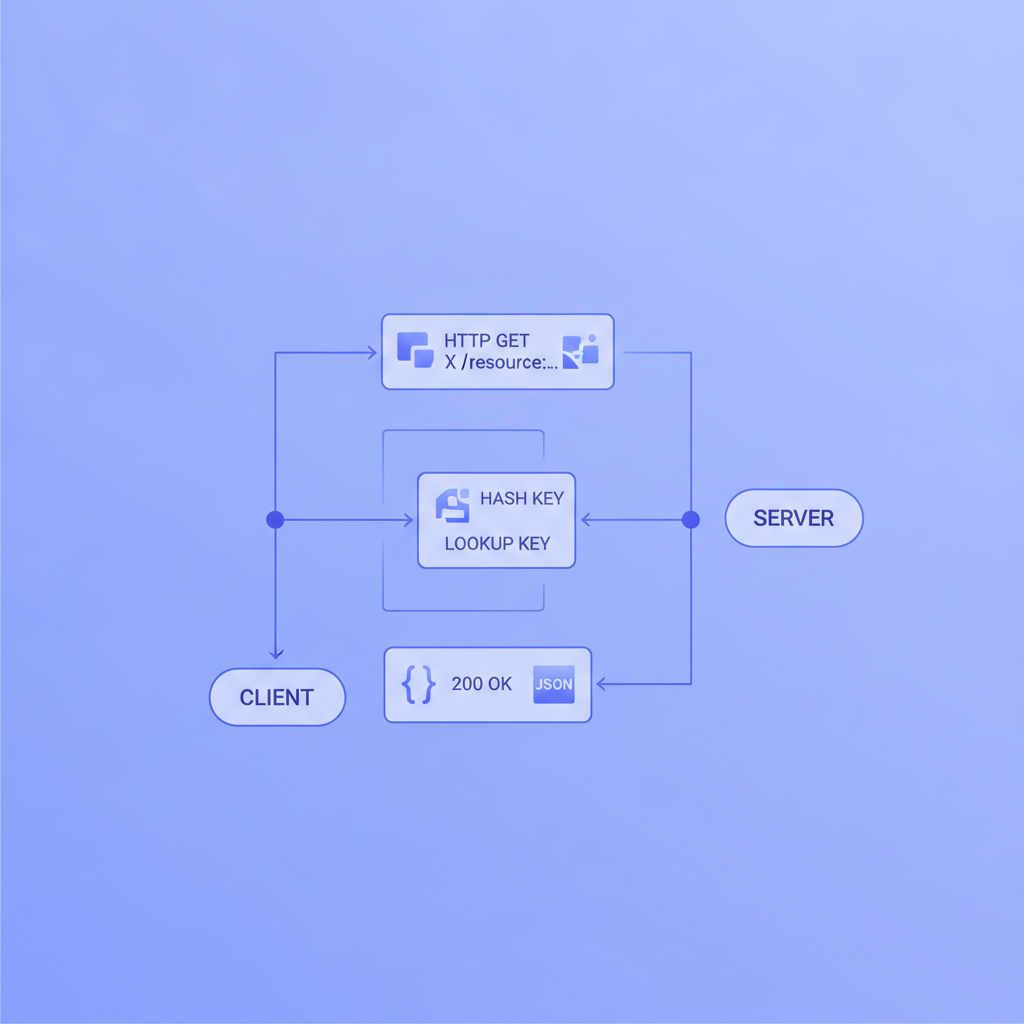
- Provisioning: You register with the API provider (or run your own API server) and generate a key. The server stores a hashed copy, not the plaintext.
- Client stores the key: You place the key in an environment variable or a secrets manager, never hard-coded in source.
- Client attaches the key to every request: The key travels in an HTTP header or query parameter (more on placement below).
- Server receives the request: It extracts the key, hashes it, and looks up the hash in its store.
- Server authorizes or rejects: If the key is found and active, processing continues. If not, the server returns a 401 or 403.
- Response is returned: A successful call returns 200 OK (or another 2xx), along with the requested data.
This flow happens on every request. Unlike session cookies, there is no login handshake; the key is the entire credential on each call. RFC 9110 Section 11 defines the HTTP authentication framework that underpins how headers like Authorization convey credentials.
Where should you send an API key?
There are three common placements, each with real trade-offs.
| Placement | Example | Pros | Cons |
|---|---|---|---|
Authorization header with ApiKey scheme | Authorization: ApiKey sk_live_abc123 | Conventional, not logged by most servers, works with HTTP/2 | Some older gateways strip non-Bearer auth headers |
Custom header (X-API-Key) | X-API-Key: sk_live_abc123 | Widely supported, semantically clear, easy to filter in logs | Not a standard header; CORS preflight required for browsers |
| Query parameter | GET /data?api_key=sk_live_abc123 | Simple to test in a browser address bar | Key appears in server access logs, proxy logs, and browser history; strongly discouraged for production |
Most API design guides recommend the X-API-Key header or the Authorization header. Query-parameter keys are convenient for quick tests but create serious exposure risks in production because URLs are routinely logged in full.
A real cURL example with an API key
The following request fetches a list of orders from a hypothetical e-commerce API, sending the key in an X-API-Key header:
curl -X GET https://api.example.com/v1/orders \
  -H "X-API-Key: sk_live_4f8a2c1d9e7b3a0f5c6d8e2a1b4f7c9d" \
  -H "Accept: application/json"
A successful response looks like this:
HTTP/2 200 OK
Content-Type: application/json

{
  "orders": [
    { "id": "ord_001", "total": 49.99, "status": "shipped" },
    { "id": "ord_002", "total": 12.00, "status": "processing" }
  ]
}
What happens when an API key fails?
This is where most developers lose time. The server's response code tells you exactly what went wrong, but only if you know how to read it.
HTTP 401 Unauthorized: the key is missing or unrecognizable
Send the same request without the header:
curl -X GET https://api.example.com/v1/orders \
  -H "Accept: application/json"
Response:
HTTP/2 401 Unauthorized
Content-Type: application/json
WWW-Authenticate: ApiKey realm="api.example.com"

{
  "error": "missing_credentials",
  "message": "No API key was provided. Include it in the X-API-Key header."
}
401 means the server cannot identify the caller at all. The WWW-Authenticate header tells clients which scheme to use.
HTTP 403 Forbidden: the key is valid but lacks permission
HTTP/2 403 Forbidden
Content-Type: application/json

{
  "error": "insufficient_scope",
  "message": "Your API key does not have access to the orders resource."
}
403 means the server recognized the key but the associated account does not have permission for that operation. This is an authorization failure, not an authentication failure. Getting the distinction right matters for your own error responses and your documentation.
HTTP 429 Too Many Requests: the key is being rate-limited
HTTP/2 429 Too Many Requests
Retry-After: 60
Content-Type: application/json

{
  "error": "rate_limit_exceeded",
  "message": "You have exceeded 100 requests per minute. Retry after 60 seconds."
}
Rate limits are almost always enforced per key, so each key gets its own bucket. When you see 429, back off and retry after the value in the Retry-After header.
API keys versus bearer tokens and JWTs
The terms get conflated, so here is a precise comparison:
| Property | API key | Bearer token (OAuth 2.0) | JWT |
|---|---|---|---|
| Carries claims? | No | No (opaque reference token) | Yes (self-contained JSON payload) |
| Expires? | Rarely, by design | Yes, usually hours | Yes, encoded in exp claim |
| Server must look up? | Yes | Yes (introspection or token DB) | No (verify signature locally) |
| Revocable? | Yes, delete from DB | Yes | Difficult without a denylist |
| Best for | Server-to-server, simple integrations | Delegated user access | Stateless microservice auth |
An API key is the right tool when you control both sides of the integration and want simplicity over expiry management. For user-delegated access, OAuth 2.0 bearer tokens are the safer choice.
How to document an API key in API Blueprint
If you use Apidoke to publish your API docs, you describe authentication in a metadata section at the top of your API Blueprint document and then reference it on each action. Here is a minimal but complete example:
FORMAT: 1A
HOST: https://api.example.com

# Example Commerce API

All endpoints require a valid API key in the `X-API-Key` header.
Keys are issued from the developer dashboard and scoped to an account.

## Group Orders

### List Orders [GET /v1/orders]

+ Request (application/json)

    + Headers

            X-API-Key: sk_live_4f8a2c1d9e7b3a0f5c6d8e2a1b4f7c9d

+ Response 200 (application/json)

        {
          "orders": [
            { "id": "ord_001", "total": 49.99, "status": "shipped" }
          ]
        }

+ Response 401 (application/json)

        {
          "error": "missing_credentials",
          "message": "No API key was provided."
        }

+ Response 403 (application/json)

        {
          "error": "insufficient_scope",
          "message": "Your key lacks permission for this resource."
        }
Apidoke parses this in the browser and renders a 3-column view: navigation on the left, the written description in the center, and the live try-it console on the right. When a reader pastes their own key into the console and clicks Send, the HTTP request goes directly from their browser to your API server. The key never passes through Apidoke's infrastructure, which matters when you are dealing with production credentials.
For a broader look at documenting authentication schemes in Blueprint, the API Blueprint authentication schemes guide covers OAuth 2.0 and bearer tokens alongside API keys with more blueprint examples.
Security practices every API key implementation should follow
- Store hashed copies server-side. Use a fast keyed hash (HMAC-SHA256) so a database breach does not expose live keys.
- Transmit over HTTPS only. A key sent over plain HTTP is visible to any network observer between client and server.
- Rotate keys regularly. Give each key a recommended rotation cycle (90 days is a common policy) and document how to rotate without downtime.
- Scope keys to the minimum required permission. A read-only key for a reporting dashboard should not be able to delete records.
- Log key usage, not key values. Record the key ID or a prefix for audit trails, never the full secret.
- Provide a revocation path. Your docs should explain exactly how a consumer can invalidate a compromised key immediately.
MDN's HTTP Authentication guide gives a solid technical foundation for how the Authorization header and WWW-Authenticate challenges are designed to work.
Where API key documentation fits in your broader API reference
An API key section belongs at the very top of your authentication chapter, before any endpoint reference. Developers who cannot authenticate cannot test anything else, so removing that friction early is one of the highest-leverage improvements you can make to onboarding. The pattern is: explain the key format, show where to send it, give a copy-paste cURL example with a real (or clearly placeholder) key value, and document every error response they might see during setup.
This connects directly to the wider discipline of writing clear API documentation covered in the API fundamentals cluster, where authentication is treated as the prerequisite to every other concept a new developer needs to learn.
If you want to see how the key fits inside a full endpoint document, the step-by-step walkthrough in How to Document a REST API: A Step-by-Step Tutorial builds a complete blueprint from scratch, including the auth section.
Frequently asked questions
Is an API key the same as a password?
Functionally similar but not identical. Both are shared secrets, but passwords authenticate a human via a login flow, while an API key authenticates an application directly on each request with no login session. API keys are also typically longer and randomly generated rather than user-chosen, which makes brute-force attacks impractical.
Should I put my API key in a query parameter or a header?
Use a header in production, almost always. Query parameters appear in server access logs, browser history, and proxy logs in plain text, which greatly increases the chance of accidental exposure. Reserve query-parameter keys for internal tooling or demos where log hygiene is not a concern.
What HTTP status code should an API return for a bad API key?
Return 401 Unauthorized when the key is missing, malformed, or unrecognized, and include a WWW-Authenticate header describing the expected scheme. Return 403 Forbidden when the key is valid but the account does not have permission for the specific resource or action being requested.
How is an API key different from a bearer token?
A bearer token (as defined in OAuth 2.0) is typically short-lived and obtained through an authorization flow, often on behalf of a user. An API key is long-lived, identifies an application rather than a user, and is sent directly without any prior handshake. The practical difference is that bearer tokens expire automatically, while API keys must be explicitly rotated or revoked.
Can I test an API key without writing any code?
Yes. If your API documentation is published with Apidoke, the try-it console in the right column of the viewer lets you type or paste your key into the header field and click Send. The browser fires the actual HTTP request to your server and displays the full response, including the status code and body, right in the page. No Postman, no terminal, no code required.
Ready to publish an API reference that shows readers exactly where to send their keys, complete with a live try-it console they can use immediately? Sign in to Apidoke and start writing your first blueprint, no credit card required.
Related reading: API Rate Limiting Explained: 429 Errors, Headers, and How to Document Limits
Related reading: 401 vs 403: The Difference, With Real API Examples