
Query Parameters vs Path Parameters vs Headers vs Body: Where Each Goes

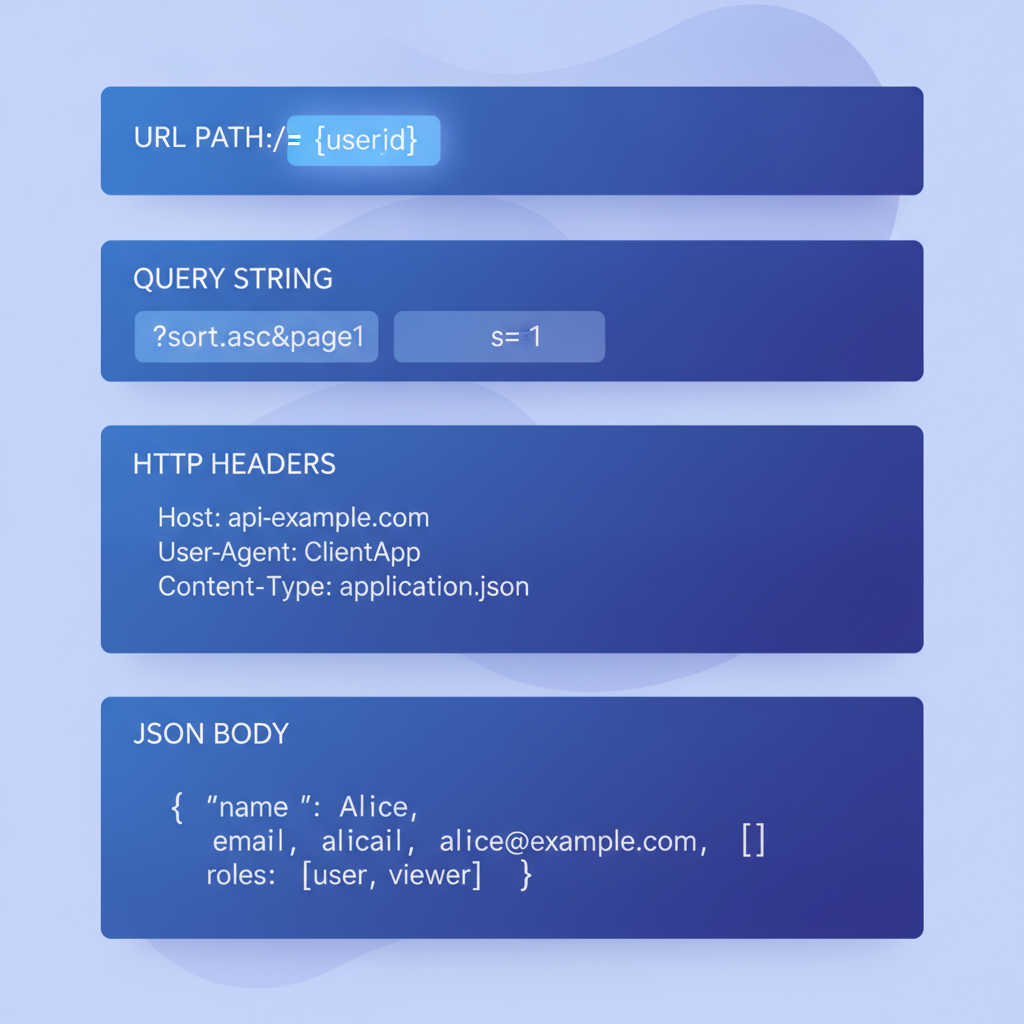
Query parameters, path parameters, headers, and request bodies are the four places you can attach data to an HTTP request. The rule of thumb: path parameters identify a specific resource (/users/42), query parameters filter or modify a collection (/users?role=admin), headers carry cross-cutting metadata like authentication tokens or content negotiation, and the request body carries the payload you want to create or update. Apidoke's live try-it console lets you experiment with all four without leaving your docs.
- Path parameters are part of the URL path itself and identify one exact resource; they are always required.
- Query parameters appear after the
?and are usually optional; use them for filtering, sorting, pagination, or search. - Headers carry metadata (authentication, content type, caching) that applies to every request in a session, not just one resource.
- The request body carries structured data for write operations (POST, PUT, PATCH); never put sensitive data in a URL.
What are path parameters?
A path parameter (sometimes called a URI parameter or route parameter) is a named placeholder inside the URL path itself. The server uses it to look up one specific resource. For example:
GET /users/42
GET /orders/8f3a-c921/items/5
Here 42 is the user ID and 8f3a-c921 is the order ID. Neither value is optional; remove either one and the URL no longer points to anything meaningful. Path parameters are defined in the URL template using curly braces: /users/{userId}. The API Blueprint URI templates guide covers the RFC 6570 syntax for expressing these in your blueprint document.
When should you use a path parameter?
Use a path parameter when the value is mandatory and uniquely identifies a resource in your hierarchy. Good candidates are primary keys (userId, orderId), slugs (article-slug), and version identifiers in URL-based versioning (/v2/users/42). If removing the value makes the URL ambiguous or meaningless, it belongs in the path.
What are query parameters?
Query parameters are key-value pairs appended to a URL after a ?, separated by &. They are typically optional and modify how the server handles the request rather than identifying a specific resource:
GET /users?role=admin&page=2&limit=25&sort=created_atThe server returns the same /users collection regardless of which query parameters are present, but the response is filtered and shaped by them. According to RFC 9110 (the HTTP Semantics specification), the query component is part of the target URI and is controlled entirely by the origin server; there is no built-in HTTP rule about what belongs there.
Common uses for query parameters
- Filtering:
/products?category=shoes&color=red - Pagination:
/articles?page=3&limit=20 - Sorting:
/transactions?sort=amount&order=desc - Search:
/users?q=alice - Sparse fieldsets:
/orders?fields=id,status,total - Format hints:
/data?format=csv(though theAcceptheader is usually more correct)
What you should never put in a query parameter
Query parameters appear in browser history, server logs, and referrer headers. Never put passwords, session tokens, or private API keys in a query string. They will leak. Use headers for secrets.
What are HTTP headers?
Headers are name-value pairs sent in the HTTP request or response envelope, before the body. They carry metadata that applies broadly across requests rather than describing one specific resource or action. The client sends request headers; the server replies with response headers.
The most common request headers and what they carry
| Header | What it carries | Example |
|---|---|---|
Authorization | Credentials for authentication | Bearer eyJhbGci... |
Content-Type | Media type of the request body | application/json |
Accept | Media types the client can handle | application/json, text/html |
X-API-Key | API key authentication (custom header) | sk_live_abc123 |
X-Request-Id | Idempotency or correlation token | req_8f3a-c921 |
Cache-Control | Caching directives | no-cache |
Accept-Language | Preferred response language | en-US, fr;q=0.8 |
The key insight: headers carry how to handle the request, not what the request is about. Authentication tokens, content negotiation, rate-limit feedback, and correlation IDs are all header territory. The guide to API keys explains in detail why the Authorization or a custom X-API-Key header is the correct place to send credentials rather than a query parameter.
What goes in the request body?
The request body (also called the payload or message body) carries the data you want to send to the server for write operations. It is used with POST, PUT, and PATCH requests. GET and DELETE requests technically can have a body but most servers and proxies ignore it, so in practice you should not use a body on GET.
A typical JSON body for creating a user looks like this:
POST /users HTTP/1.1
Content-Type: application/json
Authorization: Bearer eyJhbGci...

{
  "name": "Alice Nguyen",
  "email": "alice@example.com",
  "role": "editor"
}
The server responds with a 201 Created and the new resource:
HTTP/1.1 201 Created
Content-Type: application/json
Location: /users/42

{
  "id": 42,
  "name": "Alice Nguyen",
  "email": "alice@example.com",
  "role": "editor",
  "createdAt": "2026-11-03T09:12:00Z"
}
Body data can be JSON, form-encoded, multipart (for file uploads), or any other media type declared in Content-Type. JSON (application/json) is the standard choice for REST APIs today.
Side-by-side comparison: choosing the right location
| Criterion | Path parameter | Query parameter | Header | Body |
|---|---|---|---|---|
| Purpose | Identify a resource | Filter, sort, paginate | Metadata, auth, negotiation | Structured payload to write |
| Required? | Always | Usually optional | Depends on endpoint | POST/PUT/PATCH: yes |
| Visible in logs? | Yes (URL) | Yes (URL) | Often yes (but not cached) | Depends on logging config |
| Safe for secrets? | No | No | Yes (use HTTPS) | Yes (use HTTPS) |
| HTTP methods | All | Mostly GET | All | POST, PUT, PATCH |
| Size limit | URL length (~2 KB typical) | URL length (~2 KB typical) | Varies by server (8 KB common) | Server-defined (MBs to GBs) |
| Bookmarkable / shareable | Yes | Yes | No | No |
How to document all four in API Blueprint
API Blueprint (the Markdown-based format Apidoke uses) gives you dedicated syntax for each location. Here is a complete, copy-paste example covering all four in one endpoint definition:
# Group Users

## Users Collection [/users{?role,page,limit}]

### List Users [GET]

Returns a paginated list of users, optionally filtered by role.

+ Parameters
    + role (string, optional) - Filter by user role. Example: `admin`
    + page (number, optional) - Page number, 1-indexed. Default: `1`
    + limit (number, optional) - Items per page. Default: `20`. Max: `100`

+ Request (application/json)
    + Headers

            Authorization: Bearer eyJhbGciOiJIUzI1NiJ9...
            Accept: application/json

+ Response 200 (application/json)
    + Body

            {
              "data": [
                { "id": 1, "name": "Alice", "role": "admin" },
                { "id": 2, "name": "Bob", "role": "admin" }
              ],
              "page": 1,
              "limit": 20,
              "total": 2
            }

+ Response 401 (application/json)
    + Body

            { "error": "unauthorized", "message": "Bearer token missing or invalid." }

## User [/users/{userId}]

+ Parameters
    + userId (number, required) - The numeric ID of the user.

### Get User [GET]

+ Request (application/json)
    + Headers

            Authorization: Bearer eyJhbGciOiJIUzI1NiJ9...

+ Response 200 (application/json)
    + Body

            { "id": 42, "name": "Alice Nguyen", "email": "alice@example.com", "role": "editor" }

+ Response 404 (application/json)
    + Body

            { "error": "not_found", "message": "User 42 does not exist." }

### Update User [PATCH]

+ Request (application/json)
    + Headers

            Authorization: Bearer eyJhbGciOiJIUzI1NiJ9...
            Content-Type: application/json

    + Body

            { "role": "admin" }

+ Response 200 (application/json)
    + Body

            { "id": 42, "name": "Alice Nguyen", "email": "alice@example.com", "role": "admin" }
Notice the structure: path parameters live inside the URL template (/users/{userId}) and are listed in the + Parameters block. Query parameters are appended to the template as {?role,page,limit} and also listed in + Parameters. Headers sit inside the + Request block under + Headers. The body is indented JSON under + Body. For a broader reference on request and response body syntax, see the API Blueprint request and response bodies deep dive.
Edge cases and common mistakes
Filtering by ID: query parameter or path parameter?
A question that trips up a lot of teams. GET /users/42 and GET /users?id=42 look similar, but they carry different semantics. The first says "give me exactly this resource"; the server should return a 404 if user 42 does not exist. The second says "give me all users matching this filter"; the server can return an empty array with a 200 if no match is found. Choose based on what you want the error behaviour to be.
Putting authentication in a query parameter
Some older APIs used ?api_key=abc123. This exposes your credential in browser history, referrer headers, and access logs. Use the Authorization header or a custom header like X-API-Key instead. Apidoke's try-it console sends headers directly from the browser to your API without routing credentials through Apidoke's servers, so tokens remain private to the user's session.
Sending large amounts of data in query parameters
URLs have a practical length limit (most browsers and proxies accept around 2,000 characters before truncating). If you need to send a list of 200 IDs to a bulk-fetch endpoint, a POST body is safer than a comma-separated query parameter.
Using a body on GET
Some teams try to send a JSON body with a GET request to build complex search queries. While technically not forbidden by the HTTP specification, many proxies, CDNs, and HTTP clients strip or reject GET bodies. MDN's GET method documentation notes that GET requests should have no body. Use POST with a body for complex search operations, or flatten your search criteria into query parameters.
Custom headers vs query parameters for versioning
Some APIs version via a header (API-Version: 2026-11) and some via a query parameter (?version=2). URL path versioning (/v2/users) is the most common convention because it is explicit, cacheable, and debuggable. The tradeoffs are covered in depth in the API versioning strategies guide.
Step-by-step: deciding where your data belongs
- Ask: does the value uniquely identify one specific resource in the URL hierarchy? If yes, it is a path parameter.
- Ask: does the value filter, sort, or paginate a collection, or is it truly optional? If yes, it is a query parameter.
- Ask: is the value credentials, a content type negotiation signal, a caching directive, or other per-request metadata? If yes, it goes in a header.
- Ask: are you creating or updating a resource and need to send structured data? If yes, use the request body.
- Ask: is the data sensitive (password, token, private key)? If yes, never put it in a path or query parameter. Use a header or the body, always over HTTPS.

How this plays out in Apidoke's try-it console
When you publish an API Blueprint document with Apidoke, the three-column viewer renders separate input fields for each parameter type: path parameters are shown as inline text inputs inside the URL preview, query parameters appear in a dedicated query table below the URL, and headers get their own collapsible section. The request body gets a JSON editor pane. This mapping directly mirrors the conceptual separation in this article, so readers of your docs see exactly where each value goes before they fire a real request. No separate configuration is needed; Apidoke's in-browser parser reads the parameter types from your blueprint and builds the form automatically.
Frequently asked questions
What is the difference between a path parameter and a query parameter?
A path parameter is embedded in the URL path itself (/users/42) and identifies a specific resource; it is always required. A query parameter follows the ? in a URL (/users?role=admin) and is usually optional, used for filtering, sorting, or pagination. Remove a path parameter and the URL breaks; remove a query parameter and the endpoint still works, just without that modification.
Can I use query parameters for authentication?
You can, but you should not. Query parameters appear in browser history, server access logs, and HTTP referrer headers, all of which can leak credentials. Send authentication data in the Authorization header or a custom header like X-API-Key over HTTPS instead.
When should I use the request body instead of query parameters?
Use the request body for write operations (POST, PUT, PATCH) and when you need to send structured or large data. Query parameters are best for read operations (GET) with simple, short values. If your filter logic is complex enough that it would make the URL too long to be practical, a POST body or a dedicated search endpoint is cleaner.
What HTTP status code comes back if a required path parameter is wrong?
If the path parameter format is invalid (letters where a number is expected), most servers return a 400 Bad Request. If the format is correct but no resource with that ID exists, the correct response is 404 Not Found. Some APIs return 404 for both to avoid revealing whether IDs exist at all.
How do I document query parameters in API Blueprint?
Add them to the URL template using the {?param1,param2} RFC 6570 expression, then list each one in the + Parameters block with its type, whether it is optional or required, a description, and a default value or example. Apidoke's parser reads those annotations and generates the query parameter input fields in the live try-it console automatically.
Ready to put this into practice? Open Apidoke's editor, write your first endpoint with path and query parameters, and publish a live interactive reference in minutes. Sign in or create a free account at docs.apidoke.com to get started.
Related reading: Free Public APIs for Testing (No Sign-Up), With Live Docs You Can Try